More about machine learning: Machine Learning with Python
- Linear regression
- Logistic regression
- Decision trees
- Random forest
- Gradient boosting
- Machine learning with Python and Scikitlearn
- Neural Networks
- Principal Component Analysis (PCA)
- Clustering with python
- Anomaly detection with PCA
- Face Detection and Recognition
- Introduction to Graphs and Networks

Introduction
Predicting a continuous variable $Y$ from one or more predictors $X$ is a fundamental problem in supervised learning, addressable through many machine learning and classical statistical methods. Whether assuming linear relationships or allowing complex non-linear interactions, the standard goal of most algorithms is to estimate the conditional mean of the response variable given the predictors: $E[Y|X=x]$. This approach is known as point estimation.
While knowing the expected value (the mean) is crucial, this statistic summarises information in a way that ignores other characteristics of the distribution of $Y$ that may be vital for decision-making — especially understanding what happens in the tails of the distribution. This is where quantile regression comes in.
The quantile of order $\tau$ (where $0 < \tau < 1$) of a distribution is the value that divides the data such that a proportion $\tau$ of the population falls below or at that value. For example, the 0.36 quantile leaves 36% of values below it, and the 0.50 quantile corresponds to the median. In practice, with finite samples, the observed proportion below the estimated regression hyperplane will be approximately $\tau$, improving as sample size increases.
Although the underlying mathematics of quantile regression models differs (weighted absolute deviations are minimised instead of squared errors), the interpretation of results is analogous: coefficients estimate the effect of each predictor, but now on a specific quantile of the response variable rather than on its mean. This flexibility allows modelling the influence of predictors across the entire distribution.
The limitation of predicting the mean: a practical example
Imagine a simplified scenario for the electricity consumption of a city. Suppose the average consumption remains constant throughout the day at 15 MWh. However, the spread of this consumption is not constant (a phenomenon known as heteroscedasticity): at night consumption is very stable, but during peak hours it fluctuates widely.
If we train a standard regression model, it will correctly predict a value close to 15 MWh for both 02:00 and 10:00. The model "gets" the average right, but fails to tell the full story.
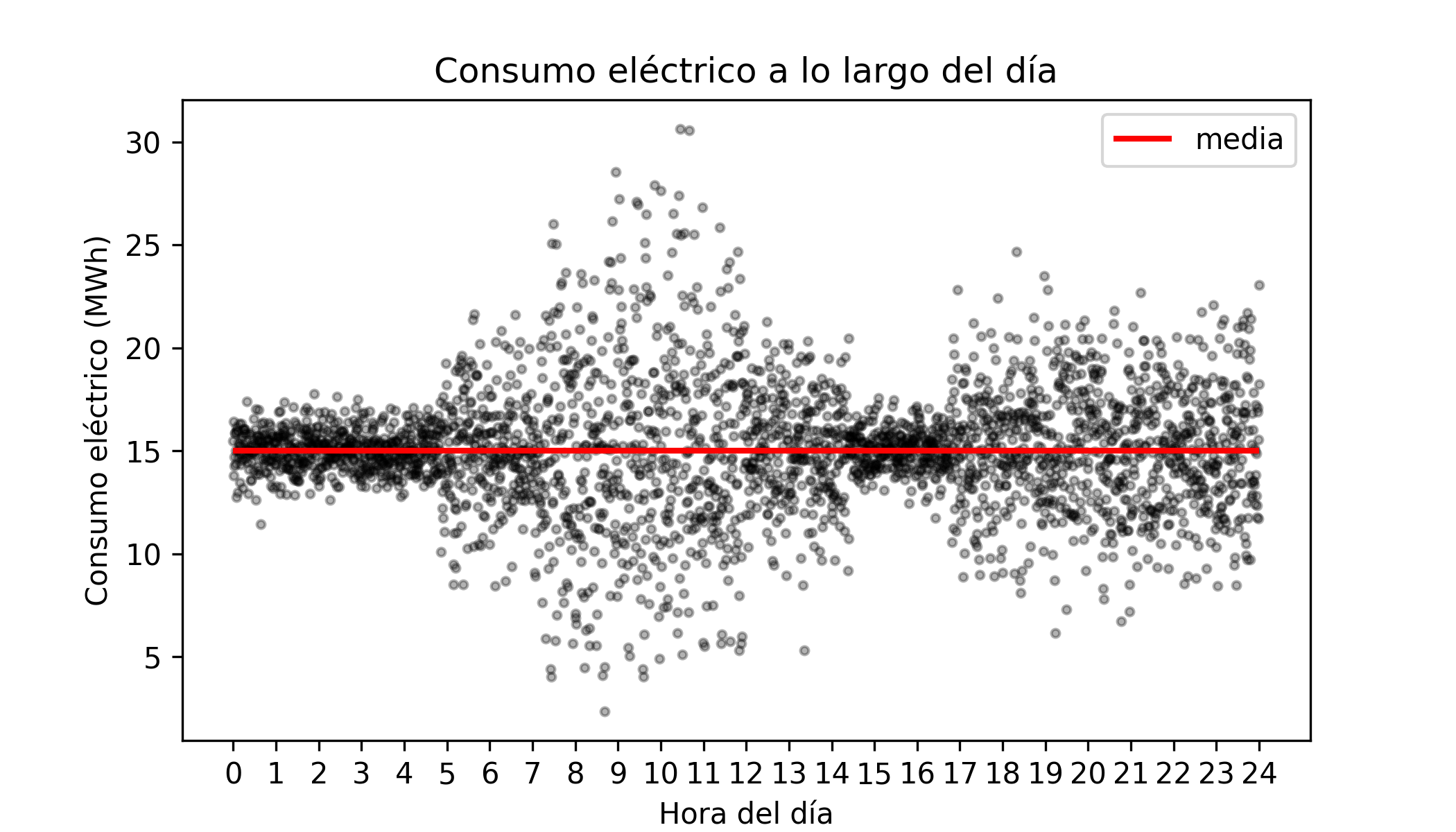
Suppose the electricity company must guarantee supply even if demand rises 50% above the mean (reaching 22.5 MWh). Maintaining that reserve capacity is costly.
A mean-based model will report an expected consumption of 15 MWh at both hours, hiding the risk.
In reality, at 02:00 the probability of reaching 22.5 MWh is almost zero (we can save costs).
At 10:00, due to the high variance, reaching that peak is a real possibility (the reserve is needed).
To answer questions about risks, extremes and dispersion, we need to go beyond the average and use quantile regression. This technique allows modelling the influence of predictors on any part of the distribution of the response variable, not just its centre.
The quantile of order $\tau$ (where $0 < \tau < 1$) of a random variable is the value that divides its distribution such that a proportion $\tau$ of the population falls below that value.
The quantile $\tau = 0.5$ corresponds to the median (leaves 50% of data below).
The quantile $\tau = 0.9$ indicates a value exceeded by only 10% of cases (ideal for estimating demand peaks).
By predicting multiple quantiles (for example, 0.1, 0.5 and 0.9) conditioned on the predictors, we obtain a complete picture of the behaviour of the response variable. This enables:
Prediction intervals: bounding the range of values within which reality is likely to fall.
Robustness: modelling the median ($\tau=0.5$) is far more robust to outliers than modelling the mean.
Heteroscedasticity detection: identifying regions of the predictor space where uncertainty is greatest.
Anomaly detection: identifying observations that fall outside expected quantile ranges.
In short, while classical regression tells us what to expect on average, quantile regression allows us to understand what is possible at the extremes — providing a powerful tool for risk management and informed decision-making.
This document shows how to train linear and non-linear quantile regression models using Python.
💡 Tip
This document is part of a broader series on probabilistic machine learning.
Linear models
The following example shows how to use linear regression models to predict quantiles.
Libraries
# Data processing
# ==============================================================================
import pandas as pd
import numpy as np
# Plots
# ==============================================================================
import matplotlib.pyplot as plt
import matplotlib.cm as cm
plt.style.use('fivethirtyeight')
plt.rcParams['lines.linewidth'] = 1.5
plt.rcParams['font.size'] = 8
import seaborn as sns
# Models
# ==============================================================================
import statsmodels.api as sm
from statsmodels.regression.quantile_regression import QuantReg
from sklearn.linear_model import QuantileRegressor, LinearRegression
from sklearn.model_selection import GridSearchCV
from sklearn.metrics import make_scorer, mean_pinball_loss
from sklearn.ensemble import HistGradientBoostingRegressor
from catboost import CatBoostRegressor
# Warnings configuration
# ==============================================================================
import warnings
warnings.filterwarnings('once')
Data
A simulated dataset is used in which the variance is not constant (heteroscedasticity), but increases as the value of the predictor $X$ increases.
# Data
# ==============================================================================
X = np.linspace(0, 100, 100)
variance = 0.1 + 0.05 * X
b_0 = 6
b_1 = 0.1
rng = np.random.default_rng(seed=12345)
error = rng.normal(loc=0, scale=variance, size=100)
y = b_0 + b_1 * X + error
data = pd.DataFrame({"x": X, "y": y})
data.head(3)
| x | y | |
|---|---|---|
| 0 | 0.000000 | 5.857617 |
| 1 | 1.010101 | 6.291208 |
| 2 | 2.020202 | 6.027008 |
# Plot with regression line and confidence interval
# ==============================================================================
fig, ax = plt.subplots(figsize=(6, 3))
sns.regplot(
data=data,
x="x",
y="y",
ci=95,
scatter_kws={"alpha": 0.7, 'color': "gray", "s": 25},
line_kws={"color": "blue", "linewidth": 2},
ax=ax
)
ax.set_ylim(0, 25)
ax.set_xlabel("x")
ax.set_ylabel("y")
plt.show()

The plot shows a clear lack of homoscedasticity: the variance of the response variable increases as the predictor value increases. This constitutes a violation of the assumptions required for ordinary least squares (OLS) linear regression, limiting the validity and interpretation of its results.
Although OLS linear regression provides an unbiased estimate of the mean and is, in that sense, the best possible linear estimator, for high values of $X$ (e.g. $X = 75$) the confidence intervals are overly optimistic compared to what the data actually shows. Several strategies exist to mitigate this problem, such as Weighted Least Squares regression. However, this section focuses on quantile regression.
Model
Several Python libraries allow fitting quantile regression models. This example uses the QuantReg class from the statsmodels package and the QuantileRegressor class from sklearn.
Statsmodels
# Quantile linear regression model with statsmodels
# ==============================================================================
model = QuantReg(data['y'], sm.add_constant(data['x']))
quantile = 0.9
res = model.fit(q=quantile)
print(res.summary())
QuantReg Regression Results
==============================================================================
Dep. Variable: y Pseudo R-squared: 0.5282
Model: QuantReg Bandwidth: 2.932
Method: Least Squares Sparsity: 8.690
Date: Mon, 02 Mar 2026 No. Observations: 100
Time: 19:21:49 Df Residuals: 98
Df Model: 1
==============================================================================
coef std err t P>|t| [0.025 0.975]
------------------------------------------------------------------------------
const 6.5870 0.557 11.834 0.000 5.482 7.692
x 0.1436 0.010 14.889 0.000 0.124 0.163
==============================================================================
The summary() of a model returns the regression coefficients for each predictor along with their corresponding confidence intervals. According to the model, for each unit increase in predictor $X$, the 0.9 quantile of the response variable increases by approximately 0.14 units. Furthermore, since the confidence interval does not contain 0, there is evidence that the predictor has a statistically significant influence.
Using the intercept and predictor estimates, the quantile regression line can be plotted.
# Plot with quantile regression line for a single quantile
# ==============================================================================
fig, ax = plt.subplots(figsize=(6, 3))
ax.scatter(data['x'], data['y'], color='gray', alpha=0.7, s=25)
# Quantile regression line = intercept + slope * x
x_pred = np.linspace(data['x'].min(), data['x'].max(), 100)
y_pred = res.params['const'] + res.params['x'] * x_pred
ax.plot(x_pred, y_pred, color='red', linewidth=1, label=f'Quantile regression (q={quantile})')
ax.set_xlabel('x')
ax.set_ylabel('y')
ax.legend();

# Plot with quantile regression lines for multiple quantiles
# ==============================================================================
fig, ax = plt.subplots(figsize=(6, 3))
ax.scatter(data['x'], data['y'], color='gray', alpha=0.7, s=25)
x_pred = np.linspace(data['x'].min(), data['x'].max(), 100)
for quantile in [0.1, 0.2, 0.3, 0.4, 0.5, 0.6, 0.7, 0.8, 0.9]:
res = model.fit(q=quantile)
y_pred = res.params['const'] + res.params['x'] * x_pred
ax.plot(x_pred, y_pred, color='firebrick', linewidth=1)
ax.set_xlabel('x')
ax.set_ylabel('y')
Text(0, 0.5, 'y')

It can be seen that the slope of each quantile line differs, meaning that predictor X influences each quantile of the response variable differently. To study how this influence varies and its statistical significance, the slope for each quantile can be plotted.
# Regression slope for each quantile
# ==============================================================================
slopes = []
quantiles = np.arange(0.1, 1.0, 0.1)
# Quantile regression slopes
for quantile in quantiles:
res = model.fit(q=quantile)
slopes.append(res.params['x'])
# OLS regression slope
model_ols = sm.OLS(data['y'], sm.add_constant(data['x']))
res_ols = model_ols.fit()
slope_ols = res_ols.params['x']
interval_ols = res_ols.conf_int(alpha=0.05).loc['x'].to_numpy()
fig, ax = plt.subplots(figsize=(6, 3))
ax.plot(quantiles, slopes, marker='o', color='darkblue', label='Slope per quantile')
ax.axhline(slope_ols, color='black', linestyle='--', label='OLS slope')
ax.fill_between(quantiles, interval_ols[0], interval_ols[1], color='gray', alpha=0.2, label='95% CI OLS')
ax.set_xlabel('Quantile')
ax.set_ylabel('Regression slope')
ax.set_title('Regression slope by quantile')
ax.legend()
plt.show()

Each point represents the estimated regression coefficient for a given quantile. The dashed black line is the OLS regression coefficient for the predictor, and the shaded grey band represents its 95% confidence interval. In this example, quantiles 0.1, 0.2, 0.3, 0.7, 0.8 and 0.9 differ significantly from the OLS estimate.
Scikit-learn
The same type of model can be trained using the QuantileRegressor class from sklearn. This implementation does not provide a statistical summary of the model, but is useful for integrating it into machine learning pipelines. Below is an example for quantile 0.9.
# Quantile linear regression model with sklearn
# ==============================================================================
quantile = 0.9
model = QuantileRegressor(quantile=quantile, alpha=0)
model.fit(data[['x']], data['y'])
print(f'Intercept : {model.intercept_}')
print(f'Coefficient: {model.coef_[0]}')
Intercept : 6.586959528616822 Coefficient: 0.14360578177073394
Quantile regression on normal distributions
One property of the normal distribution is that the mean and median are equal. This means that comparing the conditional mean (OLS regression) and the conditional median (quantile regression at $\tau = 0.5$) tends to yield the same result as the sample size grows. Small differences arise because each estimator uses a different internal optimisation procedure.
# Data from a normal distribution with a linear relationship
# ==============================================================================
rng = np.random.default_rng(seed=12345)
X_normal = rng.uniform(0, 100, 500)
# y has a linear relationship with x plus homoscedastic normal noise
y_normal = 5 + 0.5 * X_normal + rng.normal(0, 5, 500)
data_normal = pd.DataFrame({'x': X_normal, 'y': y_normal})
# Quantile regression model with sklearn
# ==============================================================================
quantile = 0.5
model_quantile = QuantileRegressor(quantile=quantile, alpha=0)
model_quantile.fit(data_normal[['x']], data_normal['y'])
print('QuantileRegressor (q=0.5)')
print(f' Intercept : {model_quantile.intercept_:.4f}')
print(f' Coefficient: {model_quantile.coef_[0]:.4f}')
QuantileRegressor (q=0.5) Intercept : 4.5489 Coefficient: 0.5113
# OLS regression model with sklearn
# ==============================================================================
model_ols = LinearRegression()
model_ols.fit(data_normal[['x']], data_normal['y'])
print(f'LinearRegression (OLS)')
print(f' Intercept : {model_ols.intercept_:.4f}')
print(f' Coefficient: {model_ols.coef_[0]:.4f}')
LinearRegression (OLS) Intercept : 4.6555 Coefficient: 0.5091
# Plot comparing regression lines
# ==============================================================================
fig, ax = plt.subplots(figsize=(6, 3))
ax.scatter(data_normal['x'], data_normal['y'], color='gray', alpha=0.5, s=15)
# Predictions from both models
x_pred_normal = np.linspace(data_normal['x'].min(), data_normal['x'].max(), 100).reshape(-1, 1)
y_pred_ols = model_ols.predict(x_pred_normal)
y_pred_quantile = model_quantile.predict(x_pred_normal)
# Regression lines
ax.plot(x_pred_normal, y_pred_ols, color='blue', linewidth=2, label='LinearRegression (mean)')
ax.plot(x_pred_normal, y_pred_quantile, color='red', linewidth=2, linestyle='--', label='QuantileRegressor (q=0.5, median)')
ax.set_xlabel('x')
ax.set_ylabel('y')
ax.set_title('Comparison: OLS vs Quantile Regression (q=0.5)')
ax.legend()
plt.show()

Non-linear models
Several machine learning algorithms allow fitting non-linear quantile regression models. One of the most widely used, and best-performing, is Gradient Boosting. All major Python implementations of this algorithm (Scikit-learn, XGBoost, LightGBM and CatBoost) support quantile regression training.
Data
The dbbmi dataset (Fourth Dutch Growth Study, Fredriks et al. (2000a, 2000b)), available in the R package gamlss.data, contains information on the age and body mass index (BMI) of 7,294 Dutch children and adolescents between 0 and 20 years old. The goal is to train a model capable of predicting quantiles of BMI as a function of age, since this is one of the standards used to detect abnormal cases that may require medical attention.
# Load data
# ==============================================================================
url = (
'https://raw.githubusercontent.com/JoaquinAmatRodrigo/'
'Estadistica-machine-learning-python/master/data/dbbmi.csv'
)
data = pd.read_csv(url)
data.head(3)
| age | bmi | |
|---|---|---|
| 0 | 0.03 | 13.235289 |
| 1 | 0.04 | 12.438775 |
| 2 | 0.04 | 14.541775 |
# Plot: distribution of BMI values
# ==============================================================================
fig, ax = plt.subplots(figsize=(6, 3))
ax.hist(data.bmi, bins=30, density=True, color='#3182bd', alpha=0.8)
ax.set_title('Distribution of body mass index values')
ax.set_xlabel('bmi')
ax.set_ylabel('density');

# Plot: BMI distribution as a function of age
# ==============================================================================
fig, axs = plt.subplots(ncols=2, nrows=1, figsize=(8, 4), sharey=True)
data[data.age <= 2.5].plot(
x = 'age',
y = 'bmi',
c = 'black',
kind = "scatter",
alpha = 0.1,
ax = axs[0]
)
axs[0].set_ylim([10, 30])
axs[0].set_title('Age <= 2.5 years')
data[data.age > 2.5].plot(
x = 'age',
y = 'bmi',
c = 'black',
kind = "scatter",
alpha = 0.1,
ax = axs[1]
)
axs[1].set_title('Age > 2.5 years')
fig.tight_layout()
plt.subplots_adjust(top = 0.85)
fig.suptitle('BMI distribution as a function of age', fontsize = 12);

This distribution has three important characteristics to bear in mind when modelling it:
The relationship between age and BMI is neither linear nor constant. There is a notable positive relationship up to 0.25 years of age, followed by a plateau until around 10 years, and then a strong upward trend from 10 to 20 years.
The variance is heterogeneous (heteroscedasticity), being lower at younger ages and greater at older ages.
The distribution of the response variable is not normal — it shows asymmetry and a positive tail.
Given these characteristics, a model is needed that:
Can learn non-linear relationships.
Can explicitly model variance as a function of the predictors, since it is not constant.
Can learn asymmetric distributions with a pronounced positive tail.
Model
This example uses the Gradient Boosting implementation from scikit-learn, although the procedure is similar for the other libraries mentioned above.
# Gradient boosting model for quantile regression
# ==============================================================================
model = HistGradientBoostingRegressor(
loss='quantile',
quantile=0.9,
learning_rate=0.1,
max_iter=50,
max_depth=10,
min_samples_leaf=20,
random_state=12345
)
model.fit(X=data[['age']], y=data['bmi'])
HistGradientBoostingRegressor(loss='quantile', max_depth=10, max_iter=50,
quantile=0.9, random_state=12345)In a Jupyter environment, please rerun this cell to show the HTML representation or trust the notebook. On GitHub, the HTML representation is unable to render, please try loading this page with nbviewer.org.
Parameters
| loss | 'quantile' | |
| quantile | 0.9 | |
| learning_rate | 0.1 | |
| max_iter | 50 | |
| max_leaf_nodes | 31 | |
| max_depth | 10 | |
| min_samples_leaf | 20 | |
| l2_regularization | 0.0 | |
| max_features | 1.0 | |
| max_bins | 255 | |
| categorical_features | 'from_dtype' | |
| monotonic_cst | None | |
| interaction_cst | None | |
| warm_start | False | |
| early_stopping | 'auto' | |
| scoring | 'loss' | |
| validation_fraction | 0.1 | |
| n_iter_no_change | 10 | |
| tol | 1e-07 | |
| verbose | 0 | |
| random_state | 12345 |
# Predictions
# ==============================================================================
predictions_q90 = model.predict(data[['age']])
predictions = pd.DataFrame({
'age': data['age'],
'quantile_90': predictions_q90
}).sort_values('age').reset_index(drop=True)
predictions.head(3)
| age | quantile_90 | |
|---|---|---|
| 0 | 0.03 | 15.348746 |
| 1 | 0.04 | 15.348746 |
| 2 | 0.04 | 15.348746 |
# Plot: predictions for quantile 90
# ==============================================================================
fig, ax = plt.subplots(figsize=(8, 4))
data.plot(
x = 'age',
y = 'bmi',
c = 'black',
kind = "scatter",
alpha = 0.1,
ax = ax
)
predictions.plot(
x = 'age',
y = 'quantile_90',
c = 'red',
kind = "line",
ax = ax
)
ax.set_title('BMI distribution as a function of age', fontsize = 12);

Hyperparameter optimisation
Just as the mean squared error (MSE) is used as the loss function for training models that estimate the conditional mean, quantile regression requires a specific loss function to estimate conditional quantiles of the target variable. The most widely used function in this context is the pinball loss (also known as quantile loss). For a set of $n$ samples, it is defined as:
$$ L_{\alpha}(y, \hat{y}) = \frac{1}{n} \sum_{i=1}^{n} \left[ \alpha \max(y_i - \hat{y}_i, 0) + (1 - \alpha)\max(\hat{y}_i - y_i, 0) \right] $$where:
- $\alpha \in (0,1)$ is the target quantile (e.g. 0.5 for the median),
- $y_i$ is the true value,
- $\hat{y}_i$ is the prediction for quantile $\alpha$.
The pinball loss introduces an asymmetric penalty:
- If $y_i > \hat{y}_i$ (underestimation), the error is penalised with weight $\alpha$.
- If $y_i < \hat{y}_i$ (overestimation), the error is penalised with weight $1 - \alpha$.
This means the cost depends directly on the quantile being estimated:
- For high quantiles (e.g. $\alpha = 0.9$), underestimations are penalised more heavily than overestimations.
- For low quantiles (e.g. $\alpha = 0.1$), the opposite is true.
- When $\alpha = 0.5$, the loss becomes symmetric and is equivalent to minimising the mean absolute error (MAE).
In practice, hyperparameter optimisation for quantile regression models should be performed by minimising the pinball loss for the target quantile. Key considerations:
- Optimal hyperparameters can vary significantly depending on the quantile.
- It is not advisable to reuse hyperparameters tuned for the mean (via MSE) in a quantile model.
- When training multiple quantiles simultaneously, it may be necessary to optimise an aggregated loss or perform cross-validation separately per quantile.
In all cases, the goal follows the same general principle of supervised learning: minimise the defined loss function, where a lower pinball loss indicates a better fit to the target quantile.
Sklearn provides the mean_pinball_loss function to compute the pinball loss of a model. Combined with make_scorer, it facilitates evaluation and comparison of quantile regression models during hyperparameter optimisation.
# Hyperparameter optimisation for quantile regression
# ==============================================================================
alpha = 0.9
neg_mean_pinball_loss_90p_scorer = make_scorer(
mean_pinball_loss,
alpha=alpha,
greater_is_better=False, # higher pinball loss is worse, so the sign is flipped
)
model = HistGradientBoostingRegressor(
loss='quantile',
quantile=alpha,
learning_rate=0.1,
max_iter=50,
max_depth=10,
min_samples_leaf=20,
random_state=12345
)
param_grid = {
'learning_rate': [0.01, 0.1],
'max_iter': [50, 100],
'max_depth': [5, 10],
'min_samples_leaf': [10, 20]
}
search_90p = GridSearchCV(
model,
param_grid,
scoring=neg_mean_pinball_loss_90p_scorer,
n_jobs=2,
cv=5,
verbose=1
).fit(data[['age']], data['bmi'])
# Best hyperparameters
# ==============================================================================
print("-----------------------------------")
print("Best hyperparameters found")
print("-----------------------------------")
print(f"{search_90p.best_params_} : {search_90p.best_score_} ({search_90p.scoring})")
Fitting 5 folds for each of 16 candidates, totalling 80 fits
-----------------------------------
Best hyperparameters found
-----------------------------------
{'learning_rate': 0.1, 'max_depth': 5, 'max_iter': 50, 'min_samples_leaf': 20} : -0.48501445660604076 (make_scorer(mean_pinball_loss, greater_is_better=False, response_method='predict', alpha=0.9))
# Grid search results
# ==============================================================================
results = pd.DataFrame(search_90p.cv_results_)
results.filter(regex = '(param.*|mean_t|std_t)')\
.drop(columns = 'params')\
.sort_values('mean_test_score', ascending = False)
| param_learning_rate | param_max_depth | param_max_iter | param_min_samples_leaf | mean_test_score | std_test_score | |
|---|---|---|---|---|---|---|
| 9 | 0.10 | 5 | 50 | 20 | -0.485014 | 0.142316 |
| 11 | 0.10 | 5 | 100 | 20 | -0.490251 | 0.137747 |
| 15 | 0.10 | 10 | 100 | 20 | -0.492876 | 0.138301 |
| 13 | 0.10 | 10 | 50 | 20 | -0.494067 | 0.146655 |
| 8 | 0.10 | 5 | 50 | 10 | -0.503220 | 0.134202 |
| 14 | 0.10 | 10 | 100 | 10 | -0.507211 | 0.123880 |
| 12 | 0.10 | 10 | 50 | 10 | -0.507859 | 0.127315 |
| 10 | 0.10 | 5 | 100 | 10 | -0.509143 | 0.131648 |
| 7 | 0.01 | 10 | 100 | 20 | -0.549994 | 0.189920 |
| 6 | 0.01 | 10 | 100 | 10 | -0.553063 | 0.185208 |
| 3 | 0.01 | 5 | 100 | 20 | -0.556236 | 0.191080 |
| 2 | 0.01 | 5 | 100 | 10 | -0.557444 | 0.191834 |
| 5 | 0.01 | 10 | 50 | 20 | -0.615320 | 0.249112 |
| 4 | 0.01 | 10 | 50 | 10 | -0.615577 | 0.249770 |
| 0 | 0.01 | 5 | 50 | 10 | -0.620067 | 0.252319 |
| 1 | 0.01 | 5 | 50 | 20 | -0.621626 | 0.255432 |
Prediction intervals
A prediction interval provides a range of values within which a future observation is expected to fall with a given probability.
By combining quantile regression predictions, it is possible to construct a prediction interval where the lower and upper bounds are estimated directly. For example, if the model is fitted for the following quantiles:
- $Q = 0.05$
- $Q = 0.95$
the resulting predictions define, respectively, the lower and upper bound of the interval.
The theoretical coverage of the interval is calculated as the difference between the two: $0.95 - 0.05 = 0.9$.
This yields a 90% prediction interval. This means that, under a well-calibrated model and assuming no quantile crossing, approximately 90% of true values should fall within this interval.
# Predictions for quantiles 05 and 95 to construct a 90% interval
# ==============================================================================
model_05p = HistGradientBoostingRegressor(
loss='quantile',
quantile=0.05,
learning_rate=0.1,
max_iter=50,
max_depth=5,
min_samples_leaf=20,
random_state=12345
)
model_05p.fit(data[['age']], data['bmi'])
predictions_q05 = model_05p.predict(data[['age']])
model_95p = HistGradientBoostingRegressor(
loss='quantile',
quantile=0.95,
learning_rate=0.1,
max_iter=50,
max_depth=10,
min_samples_leaf=20,
random_state=12345
)
model_95p.fit(data[['age']], data['bmi'])
predictions_q95 = model_95p.predict(data[['age']])
predictions = pd.DataFrame({
'age' : data['age'].to_numpy(),
'bmi' : data['bmi'].to_numpy(),
'pred_quantile_05' : predictions_q05,
'pred_quantile_95' : predictions_q95
}).sort_values('age').reset_index(drop=True)
predictions.head(3)
| age | bmi | pred_quantile_05 | pred_quantile_95 | |
|---|---|---|---|---|
| 0 | 0.03 | 13.235289 | 11.871362 | 15.995399 |
| 1 | 0.04 | 12.438775 | 11.871362 | 15.995399 |
| 2 | 0.04 | 11.773954 | 11.871362 | 15.995399 |
# Plot: quantile interval 05-95
# ==============================================================================
fig, ax = plt.subplots(figsize=(8, 4))
data.plot(
x = 'age',
y = 'bmi',
c = 'black',
kind = "scatter",
alpha = 0.1,
ax = ax
)
predictions.plot(
x = 'age',
y = 'pred_quantile_05',
c = 'red',
kind = "line",
ax = ax
)
predictions.plot(
x = 'age',
y = 'pred_quantile_95',
c = 'red',
kind = "line",
ax = ax
)
ax.set_title('BMI distribution as a function of age', fontsize = 12);

✏️ Note
To obtain a better interval, it is recommended to perform hyperparameter optimisation separately for each quantile. Reusing hyperparameters tuned for the mean (via MSE) or for a different quantile typically results in suboptimal or poorly calibrated intervals.
Interval coverage
In the context of prediction intervals, coverage (or coverage probability) is the proportion of times that the true value of the target variable actually falls within the predicted interval. It is the primary metric for assessing whether our model is well calibrated.
It is important to distinguish between two concepts:
Nominal (or theoretical) coverage: the target confidence level or expected probability according to the interval construction.
Empirical (or actual) coverage: the actual proportion of observations that fall within the bounds generated by the model.
A model is well calibrated when its empirical coverage is approximately equal to its nominal coverage. If the empirical coverage is much lower (e.g. 60% instead of the expected 90%), the model is overconfident and produces intervals that are too narrow. If it is much higher, the intervals are likely too wide and therefore less informative.
# Interval coverage
# ==============================================================================
def coverage_fraction(y, y_low, y_high):
"""
Calculate the proportion of times that y falls between y_low and y_high.
"""
return np.mean(np.logical_and(y >= y_low, y <= y_high))
coverage = coverage_fraction(
y = predictions['bmi'],
y_low = predictions['pred_quantile_05'],
y_high = predictions['pred_quantile_95'],
)
print(f"Empirical coverage: {100 * coverage:.2f}%")
Empirical coverage: 90.02%
Anomaly detection
Knowing the prediction intervals is useful for detecting anomalies — observations with values that are very unlikely according to the model.
For a given age, low BMI values may indicate potential malnutrition, while very high values may signal possible overweight issues. Using the trained model, individuals whose BMI values are very unlikely for their age can be identified.
# Anomaly detection based on the 90% prediction interval
# ==============================================================================
# Anomalies: values outside the 90% interval
predictions['anomaly'] = (
(predictions['bmi'] < predictions['pred_quantile_05']) |
(predictions['bmi'] > predictions['pred_quantile_95'])
)
predictions.head()
| age | bmi | pred_quantile_05 | pred_quantile_95 | anomaly | |
|---|---|---|---|---|---|
| 0 | 0.03 | 13.235289 | 11.871362 | 15.995399 | False |
| 1 | 0.04 | 12.438775 | 11.871362 | 15.995399 | False |
| 2 | 0.04 | 11.773954 | 11.871362 | 15.995399 | True |
| 3 | 0.04 | 14.541775 | 11.871362 | 15.995399 | False |
| 4 | 0.04 | 15.325614 | 11.871362 | 15.995399 | False |
# Detected anomalies
# ==============================================================================
fig, ax = plt.subplots(figsize=(8, 4))
data.plot(
x = 'age',
y = 'bmi',
c = 'black',
kind = "scatter",
alpha = 0.1,
ax = ax
)
predictions[predictions['anomaly']].plot(
x = 'age',
y = 'bmi',
c = 'red',
kind = "scatter",
label = 'anomaly',
ax = ax
)
ax.set_title('BMI distribution as a function of age', fontsize = 12);

Multi-quantile models
One advantage of the CatBoost implementation is that it provides the MultiQuantile loss function, which allows a single model to learn multiple quantiles simultaneously, avoiding the need to train separate models for each quantile.
# Multi-quantile predictions with CatBoost
# ==============================================================================
quantiles = np.arange(0.1, 1.0, 0.1).round(2).tolist()
quantiles_str = ",".join(map(str, quantiles))
model = CatBoostRegressor(
random_state=123,
silent=True,
allow_writing_files=False,
loss_function=f'MultiQuantile:alpha={quantiles_str}',
)
model.fit(data[['age']], data['bmi'])
preds = model.predict(data[['age']])
column_names = [f'pred_quantile_{int(q * 100)}' for q in quantiles]
predictions = pd.DataFrame(preds, columns=column_names, index=data.index)
predictions['age'] = data['age'].values
predictions = predictions.sort_values('age').reset_index(drop=True)
predictions.head()
| pred_quantile_10 | pred_quantile_20 | pred_quantile_30 | pred_quantile_40 | pred_quantile_50 | pred_quantile_60 | pred_quantile_70 | pred_quantile_80 | pred_quantile_90 | age | |
|---|---|---|---|---|---|---|---|---|---|---|
| 0 | 12.188598 | 12.43901 | 13.162931 | 13.243538 | 13.665211 | 14.263665 | 14.372886 | 14.541328 | 15.202162 | 0.03 |
| 1 | 12.188598 | 12.43901 | 13.162931 | 13.243538 | 13.665211 | 14.263665 | 14.372886 | 14.541328 | 15.202162 | 0.04 |
| 2 | 12.188598 | 12.43901 | 13.162931 | 13.243538 | 13.665211 | 14.263665 | 14.372886 | 14.541328 | 15.202162 | 0.04 |
| 3 | 12.188598 | 12.43901 | 13.162931 | 13.243538 | 13.665211 | 14.263665 | 14.372886 | 14.541328 | 15.202162 | 0.04 |
| 4 | 12.188598 | 12.43901 | 13.162931 | 13.243538 | 13.665211 | 14.263665 | 14.372886 | 14.541328 | 15.202162 | 0.04 |
# Plot: multiple quantiles (10th to 90th)
# ==============================================================================
pred_cols = [c for c in predictions.columns if c != 'age']
colors = cm.coolwarm(np.linspace(0, 1, len(pred_cols)))
fig, ax = plt.subplots(figsize=(8, 4))
data.plot(
x = 'age',
y = 'bmi',
c = 'black',
kind = "scatter",
alpha = 0.1,
ax = ax
)
for col, color in zip(pred_cols, colors):
ax.plot(
predictions['age'],
predictions[col],
color=color,
label=col
)
ax.set_title('BMI distribution by age', fontsize=14)
ax.set_xlabel('age')
ax.set_ylabel('bmi')
fig.tight_layout()
plt.show()

Comparison with other probabilistic models
Given the critical need to incorporate uncertainty into decision-making, the community has developed multiple approaches to go beyond point predictions. This section compares four of the most widely used methodologies for probabilistic estimation and conditional regression.
NGBoost (Natural Gradient Boosting)
Developed by the Stanford ML Group, NGBoost is an extension of traditional Gradient Boosting aimed at uncertainty estimation.
How it works: NGBoost assumes that the target variable follows a parametric distribution $P(y|\theta)$, where $\theta$ is a parameter vector (for example, $\theta = (\mu, \sigma)$ for a Normal distribution). The model does not predict $y$ directly, but rather models the parameters $\theta$ as additive functions of the input variables $X$.
Natural Gradient: Unlike the standard gradient (used in standard gradient boosting models) which measures distances between numbers, the natural gradient measures the distance between probability distributions (using Kullback-Leibler Divergence). This makes learning more stable and mathematically elegant.
Advantage: It provides very accurate and stable uncertainty estimates.
Disadvantage: It is slower than traditional boosting models because calculating the natural gradient is computationally expensive.
BART (Bayesian Additive Regression Trees)
BART is a Bayesian model that does not rely on gradient optimization, but is instead based on Bayesian statistical sampling.
How it works: BART builds an ensemble of very simple (weak) trees. Unlike boosting, where each tree corrects the previous one, in BART the trees are modified through a process called MCMC (Markov Chain Monte Carlo). In each iteration, a modification to a tree is proposed (grow, prune, change rule, or swap) and is accepted or rejected according to the Metropolis-Hastings ratio.
Regularization (Priors): BART imposes strongly regularizing priors that penalize tree depth and leaf node weights. This forces each tree to contribute marginally (a natural shrinkage effect), preventing overfitting.
Inference Mechanism: During training, the model generates thousands of possible versions of the tree "forest." The final prediction is not a single number, but the average of all these versions. Uncertainty is obtained by observing how much the predictions vary across all generated forests.
Advantage: It does not require choosing a distribution (it is non-parametric). It is extraordinarily robust to hyperparameter tuning.
Disadvantage: The sequential MCMC process is difficult to parallelize and computationally restrictive ($O(n)$ per iteration), which limits its scalability.
GBM-LSS (Gradient Boosting for Location, Scale, and Shape)
GBM-LSS brings the concept of "Location, Scale, and Shape" to the world of high-performance Gradient Boosting (such as XGBoost or LightGBM).
How it works: It models the conditional distribution by estimating multiple parameters $\theta = (\theta_1, \theta_2, \theta_3, \theta_4)$, which typically correspond to metrics of location ($\mu$), scale ($\sigma$), skewness ($\nu$), and kurtosis ($\tau$). It allows fitting any differentiable distribution (e.g., Zero-Inflated, Tweedie, Student-t). In this sense, it is similar to NGBoost models.
Cyclic multi-parameter: The model trains trees sequentially for each parameter, meaning it assumes iterative independence between parameters.
Advantage: It is the fastest of the three and the most flexible. By leveraging infrastructures like XGBoost or LightGBM, it inherits native support for GPU parallelization, efficient early stopping, and missing value handling, allowing it to scale to millions of records.
Disadvantage: It can be difficult to configure and is sometimes unstable if the parameters are not well-balanced.
Commonly implemented through variations of algorithms such as Quantile Regression Forests (QRF) or through classic Gradient Boosting models (LightGBM, CatBoost) by changing the loss function.
Theoretical Foundation: Instead of estimating the conditional mean $\mathbb{E}[Y|X]$ or the parameters of an entire distribution $P(Y|X)$, quantile regression directly estimates a specific quantile $Q_\tau(Y|X)$ (for example, $\tau = 0.9$ for the 90th percentile). It is mathematically "distribution-free," meaning it assumes no specific shape (neither normal, gamma, nor any other).
Optimization Mechanism: It abandons mean squared error (MSE) or maximum likelihood estimation in favor of minimizing the Pinball Loss (Quantile Loss): $$L_\tau(y, \hat{y}) = \max(\tau(y - \hat{y}), (\tau - 1)(y - \hat{y}))$$ This asymmetric function penalizes underestimations and overestimations differently depending on the target quantile $\tau$.
Advantages: It is extremely robust against outliers and heteroscedasticity. It does not require prior parametric assumptions.
Limitations: While NGBoost, BART, or GBM-LSS estimate the entire probability curve (PDF), quantile regression only predicts specific predefined points (quantiles). Lacking the complete distribution, post-hoc analytical flexibility is lost: if it becomes necessary to know the exact variance or query the probability at a new threshold in the future, the model will need to be retrained to calculate those new points.
| Attribute | NGBoost | GBM-LSS | BART | Quantile Regression |
|---|---|---|---|---|
| Objective | Full Density (PDF) | Full Density (PDF) | Full Density (Posterior) | CDF Points |
| Approach | Parametric ($\mu, \sigma$) | Parametric ($\mu, \sigma, \nu, \tau$) | Bayesian (Non-parametric) | Distribution-free (Empirical) |
| Optimization | Natural Gradient (MLE/CRPS) | Taylor Expansion (Newton-Raphson) | MCMC Sampling | Pinball Loss |
| Predicted Output | Distributional parameters | Distributional parameters | Average of Markov chains | Direct intervals (e.g., $y_{10}$ to $y_{90}$) |
| Typical Issues | Slow to train | Complex to stabilize / tune | Poor scalability to Big Data | Quantile Crossing |
Session information
import session_info
session_info.show(html=False)
----- catboost 1.2.8 matplotlib 3.10.8 numpy 2.2.6 pandas 2.3.3 seaborn 0.13.2 session_info v1.0.1 sklearn 1.7.2 statsmodels 0.14.6 ----- IPython 9.8.0 jupyter_client 8.8.0 jupyter_core 5.9.1 jupyterlab 4.5.3 ----- Python 3.13.11 | packaged by Anaconda, Inc. | (main, Dec 10 2025, 21:28:48) [GCC 14.3.0] Linux-6.17.0-14-generic-x86_64-with-glibc2.39 ----- Session information updated at 2026-03-02 19:27
Citation
How to cite this document
If you use this document or any part of it, please acknowledge the source, thank you!
Quantile Regression with Python by Joaquín Amat Rodrigo, available under Attribution-NonCommercial-ShareAlike 4.0 International (CC BY-NC-SA 4.0 DEED) at https://www.cienciadedatos.net/documentos/py68-quantile-regression-python.html
Did you like the article? Your support is important
Your contribution will help me to continue generating free educational content. Many thanks! 😊



This work by Joaquín Amat Rodrigo is licensed under a Attribution-NonCommercial-ShareAlike 4.0 International.
Allowed:
-
Share: copy and redistribute the material in any medium or format.
-
Adapt: remix, transform, and build upon the material.
Under the following terms:
-
Attribution: You must give appropriate credit, provide a link to the license, and indicate if changes were made. You may do so in any reasonable manner, but not in any way that suggests the licensor endorses you or your use.
-
NonCommercial: You may not use the material for commercial purposes.
-
ShareAlike: If you remix, transform, or build upon the material, you must distribute your contributions under the same license as the original.