更多关于预测的信息请访问 cienciadedatos.net
- 使用 Python 的 ARIMA 和 SARIMAX 模型
- 使用机器学习进行时间序列预测
- 使用梯度提升方法进行时间序列预测:XGBoost、LightGBM 和 CatBoost
- 使用 XGBoost 进行时间序列预测
- 全局预测模型:多序列预测
- 全局预测模型:单序列与多序列建模的对比分析
- 概率性预测
- 深度学习预测
- 机器学习预测能源需求
- 机器学习预测网站流量
- 间歇性需求预测
- 基于树模型建模时间序列趋势
- 使用 Python 预测比特币价格
- 集成学习提升预测效果
- 可解释性预测模型
- 减轻新冠疫情对预测模型的影响
- 缺失值时间序列预测

引言
能源需求预测在电力生产、分配和利用的资源管理与规划中起着至关重要的作用。预测能源需求是一项复杂的任务,受天气模式、经济状况和社会行为等多种因素影响。本文将探讨如何利用机器学习方法构建预测模型,以预测能源需求。
时间序列与预测
时间序列是指按时间顺序排列的数据序列,时间间隔可以相等也可以不等。预测过程包括预测时间序列的未来值,可以仅基于其过去行为进行建模(自回归),也可以结合其他外部变量。
在处理时间序列时,通常不仅仅需要预测下一个时刻($t_{+1}$),更常见的目标是预测未来一段区间(($t_{+1}$), ..., ($t_{+n}$))或更远的未来时刻($t_{+n}$)。为实现这类预测,可以采用多种策略,skforecast 针对单变量时间序列预测实现了以下方法:
- 递归多步预测:由于预测 $t_{n}$ 需要 $t_{n-1}$ 的值,而 $t_{n-1}$ 是未知的,因此采用递归过程,每次新预测都基于上一次的结果。这一过程称为递归预测或递归多步预测,可通过
ForecasterRecursive类轻松实现。

- 直接多步预测:该方法为预测区间内的每一步分别训练一个模型。例如,要预测时间序列的未来 5 个值,就需要训练 5 个不同的模型,每个模型对应一个预测步长,因此各步预测结果相互独立。整个过程可通过
ForecasterDirect类自动完成。

- 多输出预测:某些机器学习模型(如长短期记忆网络 LSTM)可以一次性同时预测多个序列值(one-shot)。该策略在
ForecasterRnn类中实现。
✏️ 注意
以下是使用梯度提升方法进行时间序列预测的两个优秀案例:
库
本文使用的库如下:
# 数据处理
# ==============================================================================
import numpy as np
import pandas as pd
from astral.sun import sun
from astral import LocationInfo
from skforecast.datasets import fetch_dataset
# 绘图
# ==============================================================================
import matplotlib.pyplot as plt
from statsmodels.graphics.tsaplots import plot_acf, plot_pacf
from skforecast.plot import plot_residuals
import plotly.graph_objects as go
import plotly.io as pio
import plotly.offline as poff
pio.templates.default = 'seaborn'
poff.init_notebook_mode(connected=True)
plt.style.use('seaborn-v0_8-darkgrid')
plt.rcParams.update({'font.size': 8})
# 建模与预测
# ==============================================================================
import skforecast
import lightgbm
import sklearn
from lightgbm import LGBMRegressor
from sklearn.preprocessing import PolynomialFeatures
from sklearn.feature_selection import RFECV
from feature_engine.timeseries.forecasting import WindowFeatures
from skforecast.preprocessing import CalendarFeatures, RollingFeatures
from skforecast.recursive import ForecasterEquivalentDate, ForecasterRecursive
from skforecast.direct import ForecasterDirect
from skforecast.model_selection import (
TimeSeriesFold,
bayesian_search_forecaster,
backtesting_forecaster
)
from skforecast.feature_selection import select_features
from skforecast.stats import calculate_lag_autocorrelation
from skforecast.metrics import calculate_coverage
import shap
# 警告配置
# ==============================================================================
import warnings
warnings.filterwarnings('once')
color = '\033[1m\033[38;5;208m'
print(f'{color}Version skforecast: {skforecast.__version__}')
print(f'{color}Version scikit-learn: {sklearn.__version__}')
print(f'{color}Version lightgbm: {lightgbm.__version__}')
print(f'{color}Version pandas: {pd.__version__}')
print(f'{color}Version numpy: {np.__version__}')
Version skforecast: 0.25.0 Version scikit-learn: 1.7.2 Version lightgbm: 4.7.0 Version pandas: 2.3.3 Version numpy: 2.4.6
数据
本例使用的数据为澳大利亚维多利亚州 2012-01-01 至 2014-12-31 的电力需求(MW)时间序列。数据来源于 R 的 tsibbledata 包。数据集包含 5 列和 52,608 条完整记录。各列信息如下:
- Time:记录的日期和时间(以 UTC 存储)。
- Date:记录的日期。
- Demand:电力需求(MW)。
- Temperature:维多利亚州首府墨尔本的温度。
- Holiday:是否为公共假日。
关于单位和聚合的说明:原始的 tsibbledata 包将 Demand 标注为 "MWh",但这些数值实际上是以 MW 表示的平均功率(每个 30 分钟区间内的平均运行需求)。因此,小时序列是用均值而不是求和构建的:对两个连续的 30 分钟功率读数取平均,得到的是小时平均功率(MW),其数值与该小时的能量(1 小时窗口内的 MWh)相同。如果求和,数值会翻倍,得到的序列没有合理的物理含义。
# 数据下载
# ==============================================================================
data = fetch_dataset(name='vic_electricity', raw=True)
data.info()
╭──────────────────────────── vic_electricity ─────────────────────────────╮ │ Description: │ │ Half-hourly electricity demand for Victoria, Australia │ │ │ │ Source: │ │ O'Hara-Wild M, Hyndman R, Wang E, Godahewa R (2022).tsibbledata: Diverse │ │ Datasets for 'tsibble'. https://tsibbledata.tidyverts.org/, │ │ https://github.com/tidyverts/tsibbledata/. │ │ https://tsibbledata.tidyverts.org/reference/vic_elec.html │ │ │ │ URL: │ │ https://raw.githubusercontent.com/skforecast/skforecast- │ │ datasets/main/data/vic_electricity.csv │ │ │ │ Shape: 52608 rows x 5 columns │ ╰──────────────────────────────────────────────────────────────────────────╯
<class 'pandas.core.frame.DataFrame'> RangeIndex: 52608 entries, 0 to 52607 Data columns (total 5 columns): # Column Non-Null Count Dtype --- ------ -------------- ----- 0 Time 52608 non-null object 1 Demand 52608 non-null float64 2 Temperature 52608 non-null float64 3 Date 52608 non-null object 4 Holiday 52608 non-null bool dtypes: bool(1), float64(2), object(2) memory usage: 1.7+ MB
Time 列以 string 格式存储,且为 UTC 时间(注意每个值末尾的 Z),而原始数据集使用的是墨尔本当地时间。使用 pd.to_datetime() 函数并设置 utc=True 将其转换为 datetime 类型。转换后,为了方便使用 pandas 的功能,将其设置为索引,并通过 tz_convert() 转换为 Australia/Melbourne 时区。由于数据每 30 分钟记录一次,因此还需指定频率 '30min'。
# 数据预处理
# ==============================================================================
data['Time'] = pd.to_datetime(data['Time'], utc=True)
data = data.set_index('Time')
data = data.tz_convert('Australia/Melbourne')
data = data.sort_index()
data = data.asfreq('30min')
data.head(2)
| Demand | Temperature | Date | Holiday | |
|---|---|---|---|---|
| Time | ||||
| 2012-01-01 00:00:00+11:00 | 4382.825174 | 21.40 | 2012-01-01 | True |
| 2012-01-01 00:30:00+11:00 | 4263.365526 | 21.05 | 2012-01-01 | True |
✏️ 注意
电力需求由人类活动驱动,而人类活动遵循当地时钟:日内周期、工作日与周末的差异以及公共假日都是按当地时间定义的。因此,索引从 UTC 转换为 Australia/Melbourne 时区。如果直接使用 UTC,所有模式都会偏移 10 或 11 个小时,模型会误解日内季节性(中午的需求高峰看起来会像半夜的异常),而且将序列与其他当地信息(如公共假日)合并时也容易出错。
这里使用带时区信息的索引,而不是删除时区信息,因为维多利亚州实行夏令时(DST)。在不带时区的本地索引中,每年 10 月会缺少一个小时,每年 4 月会重复一个小时,从而破坏预测器所要求的规则频率。带时区信息的索引在这些切换点上仍保持规则的频率。唯一的副作用是,每年时钟调整的两天分别有 23 或 25 个小时,因此在这两天,滞后 24 并不完全对应前一天的同一当地小时。同理,由于回测的每个折(fold)固定为 24 步,在夏令时切换之后,每个折开始的当地小时会移动一个小时。
在处理时间序列时,首先要检查序列是否完整,即是否存在缺失值。
# 验证时间索引是否完整
# ==============================================================================
start_date = data.index.min()
end_date = data.index.max()
complete_date_range = pd.date_range(
start=start_date, end=end_date, freq=data.index.freq
)
is_index_complete = data.index.equals(complete_date_range)
print(f'Index complete: {is_index_complete}')
print(f'Number of rows with missing values: {data.isnull().any(axis=1).sum()}')
Index complete: True Number of rows with missing values: 0
# 填补时间索引中的缺口
# ==============================================================================
# data.asfreq(freq='30min', fill_value=np.nan)
虽然数据的时间间隔为 30 分钟,但本例的目标是建立能够预测每小时电力需求的模型,因此需要对数据进行聚合。此类转换可通过 Pandas 的 DatetimeIndex 索引和 resample() 方法轻松实现。
正确使用 closed='left' 和 label='right' 参数非常重要,以避免在训练中引入未来信息(信息泄露))。假设可用的时间点为 10:10、10:30、10:45、11:00、11:12 和 11:30。要获得每小时的平均值,分配给 11:00 的值应仅使用 10:10、10:30 和 10:45 的数据计算;分配给 12:00 的值应仅使用 11:00、11:12 和 11:30 的数据计算。

11:00 的平均值不包含 11:00 的点值,因为实际上该时刻的值并不可用。
⚠️ 警告
不恰当的聚合是将未来信息泄露到预测模型中最容易发生的方式之一。以下规则有助于避免这一问题:
- 使用正确的区间闭合方式和标签:当改变序列的频率时,每个区间只能包含在其标签时刻已经可用的值(本例中为
closed='left'和label='right')。 - 对滚动窗口特征进行平移:用作特征的滚动统计量只能用过去的值计算。如果窗口没有平移,时刻 t 的特征会包含在 t 观测到的值,而该值在进行预测时并不可用。skforecast 的
RollingFeatures类和 feature-engine 的WindowFeatures类(本文后面都会用到)会自动完成这一平移。 - 聚合方式应与变量的性质相匹配:对于功率或温度等状态变量,使用均值(或最后一个值);对于能量或销售额等累积变量,使用求和。
# 以 1 小时为间隔进行聚合
# ==============================================================================
# 删除 Date 列,避免聚合时报错。
data = data.drop(columns='Date')
data = (
data
.resample(rule='h', closed='left', label='right')
.agg({
'Demand': 'mean',
'Temperature': 'mean',
'Holiday': 'mean',
})
)
data
| Demand | Temperature | Holiday | |
|---|---|---|---|
| Time | |||
| 2012-01-01 01:00:00+11:00 | 4323.095350 | 21.225 | 1.0 |
| 2012-01-01 02:00:00+11:00 | 3963.264688 | 20.625 | 1.0 |
| 2012-01-01 03:00:00+11:00 | 3950.913495 | 20.325 | 1.0 |
| 2012-01-01 04:00:00+11:00 | 3627.860675 | 19.850 | 1.0 |
| 2012-01-01 05:00:00+11:00 | 3396.251676 | 19.025 | 1.0 |
| ... | ... | ... | ... |
| 2014-12-31 20:00:00+11:00 | 4069.625550 | 21.600 | 0.0 |
| 2014-12-31 21:00:00+11:00 | 3909.230704 | 20.300 | 0.0 |
| 2014-12-31 22:00:00+11:00 | 3900.600901 | 19.650 | 0.0 |
| 2014-12-31 23:00:00+11:00 | 3758.236494 | 18.100 | 0.0 |
| 2015-01-01 00:00:00+11:00 | 3785.650720 | 17.200 | 0.0 |
26304 rows × 3 columns
聚合之后,数据集起始于 2012-01-01 01:00:00,结束于 2015-01-01 00:00:00(每个时间戳标记的是在该时刻结束的那一小时)。舍弃最后一条记录,使序列结束于 2014-12-31 23:00:00。此外,为了优化模型超参数并评估其预测能力,数据被划分为训练集、验证集和测试集三部分。
# 划分数据为 train-val-test
# ==============================================================================
data = data.loc[:'2014-12-31 23:00:00', :].copy()
end_train = '2013-12-31 23:59:00'
end_validation = '2014-09-30 23:59:00'
data_train = data.loc[: end_train, :].copy()
data_val = data.loc[end_train:end_validation, :].copy()
data_test = data.loc[end_validation:, :].copy()
print(
f'Train dates : {data_train.index.min()} --- {data_train.index.max()} '
f'(n={len(data_train)})'
)
print(
f'Validation dates : {data_val.index.min()} --- {data_val.index.max()} '
f'(n={len(data_val)})'
)
print(
f'Test dates : {data_test.index.min()} --- {data_test.index.max()} '
f'(n={len(data_test)})'
)
Train dates : 2012-01-01 01:00:00+11:00 --- 2013-12-31 23:00:00+11:00 (n=17543) Validation dates : 2014-01-01 00:00:00+11:00 --- 2014-09-30 23:00:00+10:00 (n=6553) Test dates : 2014-10-01 00:00:00+10:00 --- 2014-12-31 23:00:00+11:00 (n=2207)
图形探索
通过对时间序列进行图形化探索,可以有效识别趋势、模式和季节性变化,从而为选择最合适的预测模型提供指导。
时间序列绘图
完整时间序列
# 时间序列交互式绘图
# ==============================================================================
fig = go.Figure()
for partition, name in zip(
[data_train, data_val, data_test], ['Train', 'Validation', 'Test']
):
fig.add_trace(
go.Scatter(x=partition.index, y=partition['Demand'], mode='lines', name=name)
)
fig.update_layout(
title='Hourly energy demand',
xaxis_title='Time',
yaxis_title='Demand',
legend_title='Partition:',
width=800,
height=400,
margin=dict(l=20, r=20, t=35, b=20),
legend=dict(orientation='h', yanchor='top', y=1, xanchor='left', x=0.001)
)
# fig.update_xaxes(rangeslider_visible=True)
fig.show()
上图显示,电力需求具有年度季节性。7 月份有一个高峰,1 月至 3 月期间需求也有非常明显的高峰。由于维多利亚州位于南半球,7 月的高峰对应冬季(供暖),而 1 月至 3 月的高峰则由夏季热浪(空调)引起。
时间序列片段
由于时间序列的方差较大,在完整序列的图中无法观察到日内模式。
# 时间序列局部放大图
# ==============================================================================
zoom = ('2013-05-01 14:00:00','2013-06-01 14:00:00')
fig, axs = plt.subplots(2, 1, figsize=(8, 4), gridspec_kw={'height_ratios': [1, 2]})
data['Demand'].plot(ax=axs[0], color='black', alpha=0.5)
axs[0].axvspan(zoom[0], zoom[1], color='blue', alpha=0.7)
axs[0].set_title('Electricity demand')
axs[0].set_xlabel('')
data.loc[zoom[0] : zoom[1], 'Demand'].plot(ax=axs[1], color='blue')
axs[1].set_title(f'Zoom: {zoom[0]} to {zoom[1]}', fontsize=10)
plt.tight_layout()
plt.show()

当对时间序列进行放大观察时,可以明显看到每周的季节性特征:工作日(周一至周五)用电量较高,周末用电量较低。同时,每天的用电量与前一天存在明显相关性。
季节性图
季节性图是识别时间序列中季节性模式和趋势的有力工具。其方法是对每个季节的数值进行平均,然后将其随时间绘制出来。
# 年度、每周和每日季节性
# ==============================================================================
fig, axs = plt.subplots(2, 2, figsize=(8, 5), sharex=False, sharey=True)
axs = axs.ravel()
flierprops = {'markersize': 3, 'alpha': 0.3}
# 按月份统计需求分布
data['month'] = data.index.month
data.boxplot(column='Demand', by='month', ax=axs[0], flierprops=flierprops)
data.groupby('month')['Demand'].median().plot(style='o-', linewidth=0.8, ax=axs[0])
axs[0].set_ylabel('Demand')
axs[0].set_title('Demand distribution by month', fontsize=9)
# 按星期几统计需求分布(1 = 周一)
data['week_day'] = data.index.day_of_week + 1
data.boxplot(column='Demand', by='week_day', ax=axs[1], flierprops=flierprops)
data.groupby('week_day')['Demand'].median().plot(style='o-', linewidth=0.8, ax=axs[1])
axs[1].set_ylabel('Demand')
axs[1].set_title('Demand distribution by week day', fontsize=9)
# 按一天中的小时统计需求分布(0 至 23,当地时间)
data['hour_day'] = data.index.hour
data.boxplot(column='Demand', by='hour_day', ax=axs[2], flierprops=flierprops)
# 箱线图绘制在位置 1 至 24,因此中位数也绘制在相同位置
median_hour = data.groupby('hour_day')['Demand'].median()
axs[2].plot(range(1, 25), median_hour.to_numpy(), 'o-', linewidth=0.8)
axs[2].set_ylabel('Demand')
axs[2].set_title('Demand distribution by the hour of the day', fontsize=9)
# 按星期几和小时统计需求分布
mean_day_hour = data.groupby(['week_day', 'hour_day'])['Demand'].mean()
mean_day_hour.plot(ax=axs[3])
axs[3].set(
title = 'Mean Demand during week',
xticks = [i * 24 for i in range(7)],
xticklabels = ['Mon', 'Tue', 'Wed', 'Thu', 'Fri', 'Sat', 'Sun'],
xlabel = 'Day and hour',
ylabel = 'Mean Demand'
)
axs[3].title.set_size(10)
fig.suptitle('Seasonality plots', fontsize=12)
fig.tight_layout()

从图中可以看出,该电网呈现出高度可预测的周期性模式,这是南半球地区的典型特征,具有明显的季节性和居民用电行为。
年度和季节性行为
冬季供暖主导基础需求:6 月、7 月和 8 月(第 6 至 8 月)的能源消耗中位数最高。这表明在整个澳大利亚冬季,供暖需求持续且较大。
夏季制冷造成极端峰值:1 月和 2 月(第 1 和第 2 月)的需求中位数较低,但出现了幅度很大的向上离群值。这说明虽然夏季的基础消耗较低,但极端热浪会引发整个电网同时大量使用空调。
过渡季节较为稳定:春季(9 月至 11 月)和秋季(3 月至 5 月)的总体需求最低,数据分布也最集中,这些时期既不需要大量供暖,也不需要大量制冷。
每周活动模式
商业活动影响显著:第 1 至 5 天(周一至周五)保持较高且稳定的用电量,反映了工业和商业的正常运营时间。
周末负荷下降:第 6 和第 7 天(周六和周日)的基础需求显著下降。这一下降源于商业活动的减少,不过偶尔仍会出现高需求的离群值。
日内周期
夜间低谷:能源消耗最低的时段稳定出现在 03:00 至 05:00 之间,此时人们在睡眠,商业活动暂停。
傍晚高峰:电网每天压力最大的时段是 18:00 至 20:00。此时人们下班回家,开启空调或暖气、做饭并使用家用电器。
早晨爬升:在 08:00 至 09:00 左右会出现一个较小的次高峰,此时企业开始营业、家庭开始活动,这在每周均值的连续折线图中清晰可见。
自相关图
自相关图是确定自回归模型阶数的有力工具。自相关函数(ACF)衡量时间序列与其自身滞后版本之间的相关性。偏自相关函数(PACF)衡量时间序列与其自身滞后版本之间的相关性,同时控制所有更短滞后的影响。这些图有助于确定自回归模型中应包含的滞后数。
# 自相关图
# ==============================================================================
fig, ax = plt.subplots(figsize=(5, 2))
plot_acf(data['Demand'], ax=ax, lags=60, fft=True)
plt.show()

# 偏自相关图
# ==============================================================================
fig, ax = plt.subplots(figsize=(5, 2))
plot_pacf(data['Demand'], ax=ax, lags=60, method='burg')
plt.show()

# 偏自相关绝对值最大的前 10 个滞后
# ==============================================================================
calculate_lag_autocorrelation(
data = data['Demand'],
n_lags = 60,
sort_by = 'partial_autocorrelation_abs'
).head(10)
| lag | partial_autocorrelation_abs | partial_autocorrelation | autocorrelation_abs | autocorrelation | |
|---|---|---|---|---|---|
| 0 | 1 | 0.949499 | 0.949499 | 0.949499 | 0.949499 |
| 1 | 25 | 0.758061 | -0.758061 | 0.731629 | 0.731629 |
| 2 | 2 | 0.657359 | -0.657359 | 0.836831 | 0.836831 |
| 3 | 26 | 0.623298 | 0.623298 | 0.622439 | 0.622439 |
| 4 | 24 | 0.307323 | -0.307323 | 0.785673 | 0.785673 |
| 5 | 19 | 0.290091 | 0.290091 | 0.302533 | 0.302533 |
| 6 | 21 | 0.268431 | 0.268431 | 0.537376 | 0.537376 |
| 7 | 27 | 0.257939 | -0.257939 | 0.488291 | 0.488291 |
| 8 | 20 | 0.200966 | 0.200966 | 0.414932 | 0.414932 |
| 9 | 9 | 0.184286 | 0.184286 | 0.037667 | 0.037667 |
自相关图显示,某一小时的需求与前几小时以及前几天同一小时的需求有很强的相关性。偏自相关表显示,信息量最大的滞后是最近的滞后(1 和 2)以及大约一天前的滞后(24、25 和 26)。这种相关性表明自回归模型在本场景下可能非常有效。
基线
在面对预测问题时,建立基线模型非常重要。基线模型通常是非常简单的模型,用于评估更复杂模型是否值得实现。
Skforecast 可以通过 ForecasterEquivalentDate 类轻松创建基线模型(参见基线预测器用户指南)。该模型也称为季节性朴素预测(Seasonal Naive Forecasting),其原理是直接返回前一季节同一时段的观测值(如前一周同一工作日、前一天同一小时等)。
根据前面的探索性分析,基线模型将采用前一天同一小时的值作为每小时的预测。
✏️ 注意
在接下来的代码单元中,将训练基线预测器并通过回测过程评估其预测能力。如果你对回测(backtesting)不熟悉,不必担心,本文后续会详细解释。现在只需知道,回测过程是用部分数据训练模型,再用未见过的数据评估其预测能力。该误差指标将作为后续更复杂模型预测能力的参考。
# 创建基线模型:前一天同一小时的值
# ==============================================================================
# 偏移量以步数表示(24 小时)。对于带时区信息的索引,
# pd.DateOffset(days=1) 这类日历偏移量在夏令时切换时会失败,
# 因为某些当地时间并不存在。
forecaster = ForecasterEquivalentDate(
offset = 24,
n_offsets = 1
)
# 训练预测器
# ==============================================================================
forecaster.fit(y=data.loc[:end_validation, 'Demand'])
forecaster
ForecasterEquivalentDate
General Information
- Estimator: NoneType
- Offset: 24
- Number of offsets: 1
- Aggregation function: mean
- Window size: 24
- Creation date: 2026-09-22 09:21:24
- Last fit date: 2026-09-22 09:21:24
- Skforecast version: 0.25.0
- Python version: 3.13.14
- Forecaster id: None
Training Information
- Training range: [Timestamp('2012-01-01 01:00:00+1100', tz='Australia/Melbourne'), Timestamp('2014-09-30 23:00:00+1000', tz='Australia/Melbourne')]
- Training index type: DatetimeIndex
- Training index frequency: h
# 回测
# ==============================================================================
cv = TimeSeriesFold(
steps = 24,
initial_train_size = len(data.loc[:end_validation]),
refit = False
)
metric, predictions = backtesting_forecaster(
forecaster = forecaster,
y = data['Demand'],
cv = cv,
metric = 'mean_absolute_error'
)
metric_baseline = metric
metric_baseline
| mean_absolute_error | |
|---|---|
| 0 | 318.694833 |
基线模型的误差可作为评估更复杂模型是否值得实现的参考。
递归多步预测
训练递归自回归模型 ForecasterRecursive,使用梯度提升估计器 LGBMRegressor 预测未来 24 小时的能源需求。
所用特征包括过去 24 小时的需求值(滞后 1 至 24)以及过去 3 天(72 小时)的移动平均值,后者通过 RollingFeatures 类创建。估计器的超参数均为默认值。
# 创建预测器
# ==============================================================================
# 滞后:过去 24 小时的需求
lags = 24
window_features = RollingFeatures(stats=['mean'], window_sizes=24 * 3)
forecaster = ForecasterRecursive(
estimator = LGBMRegressor(random_state=15926, verbose=-1),
lags = lags,
window_features = window_features
)
# 训练预测器
# ==============================================================================
forecaster.fit(y=data.loc[:end_validation, 'Demand'])
forecaster
ForecasterRecursive
General Information
- Estimator: LGBMRegressor
- Lags: [ 1 2 3 4 5 6 7 8 9 10 11 12 13 14 15 16 17 18 19 20 21 22 23 24]
- Window features: ['roll_mean_72']
- Calendar features: None
- Window size: 72
- Series name: Demand
- Exogenous included: False
- Categorical features: auto
- Weight function included: False
- Differentiation order: None
- Drop NaN from series: False
- Creation date: 2026-09-22 09:21:24
- Last fit date: 2026-09-22 09:21:29
- Skforecast version: 0.25.0
- Python version: 3.13.14
- Forecaster id: None
Exogenous Variables
None
Data Transformations
- Transformer for y: None
- Transformer for exog: None
Training Information
- Training range: [Timestamp('2012-01-01 01:00:00+1100', tz='Australia/Melbourne'), Timestamp('2014-09-30 23:00:00+1000', tz='Australia/Melbourne')]
- Training index type: DatetimeIndex
- Training index frequency: h
Estimator Parameters
-
{'boosting_type': 'gbdt', 'class_weight': None, 'colsample_bytree': 1.0, 'importance_type': 'split', 'learning_rate': 0.1, 'max_depth': -1, 'min_child_samples': 20, 'min_child_weight': 0.001, 'min_split_gain': 0.0, 'n_estimators': 100, 'n_jobs': None, 'num_leaves': 31, 'objective': None, 'random_state': 15926, 'reg_alpha': 0.0, 'reg_lambda': 0.0, 'subsample': 1.0, 'subsample_for_bin': 200000, 'subsample_freq': 0, 'verbose': -1}
Fit Kwargs
-
{}
回测
为获得模型预测能力的稳健估计,需进行回测。回测过程是针对测试集的每个观测点生成预测,模拟实际生产环境下的预测流程,并将预测值与真实值进行比较。
回测通过 backtesting_forecaster() 函数实现。本例中,模型用 2012-01-01 01:00 至 2014-09-30 23:00 的数据训练,然后每天 23:59 预测未来 24 小时。误差指标为平均绝对误差(MAE)。
强烈建议查阅 backtesting_forecaster() 函数文档,深入了解其功能,以便充分利用其分析模型预测能力的潜力。
# 回测
# ==============================================================================
metric, predictions = backtesting_forecaster(
forecaster = forecaster,
y = data['Demand'],
cv = cv,
metric = 'mean_absolute_error',
verbose = True, # 设为 False 可避免打印
)
metric_recursive_no_exog = metric
Information of folds
--------------------
Number of observations used for initial training: 24096
Number of observations used for backtesting: 2207
Number of folds: 92
Number skipped folds: 0
Number of steps per fold: 24
Number of steps to exclude between last observed data (last window) and predictions (gap): 0
Last fold only includes 23 observations.
Fold: 0
Training: 2012-01-01 01:00:00+11:00 -- 2014-09-30 23:00:00+10:00 (n=24096)
Validation: 2014-10-01 00:00:00+10:00 -- 2014-10-01 23:00:00+10:00 (n=24)
Fold: 1
Training: No training in this fold
Validation: 2014-10-02 00:00:00+10:00 -- 2014-10-02 23:00:00+10:00 (n=24)
Fold: 2
Training: No training in this fold
Validation: 2014-10-03 00:00:00+10:00 -- 2014-10-03 23:00:00+10:00 (n=24)
Fold: 3
Training: No training in this fold
Validation: 2014-10-04 00:00:00+10:00 -- 2014-10-04 23:00:00+10:00 (n=24)
Fold: 4
Training: No training in this fold
Validation: 2014-10-05 00:00:00+10:00 -- 2014-10-06 00:00:00+11:00 (n=24)
Fold: 5
Training: No training in this fold
Validation: 2014-10-06 01:00:00+11:00 -- 2014-10-07 00:00:00+11:00 (n=24)
Fold: 6
Training: No training in this fold
Validation: 2014-10-07 01:00:00+11:00 -- 2014-10-08 00:00:00+11:00 (n=24)
Fold: 7
Training: No training in this fold
Validation: 2014-10-08 01:00:00+11:00 -- 2014-10-09 00:00:00+11:00 (n=24)
Fold: 8
Training: No training in this fold
Validation: 2014-10-09 01:00:00+11:00 -- 2014-10-10 00:00:00+11:00 (n=24)
Fold: 9
Training: No training in this fold
Validation: 2014-10-10 01:00:00+11:00 -- 2014-10-11 00:00:00+11:00 (n=24)
Fold: 10
Training: No training in this fold
Validation: 2014-10-11 01:00:00+11:00 -- 2014-10-12 00:00:00+11:00 (n=24)
Fold: 11
Training: No training in this fold
Validation: 2014-10-12 01:00:00+11:00 -- 2014-10-13 00:00:00+11:00 (n=24)
Fold: 12
Training: No training in this fold
Validation: 2014-10-13 01:00:00+11:00 -- 2014-10-14 00:00:00+11:00 (n=24)
Fold: 13
Training: No training in this fold
Validation: 2014-10-14 01:00:00+11:00 -- 2014-10-15 00:00:00+11:00 (n=24)
Fold: 14
Training: No training in this fold
Validation: 2014-10-15 01:00:00+11:00 -- 2014-10-16 00:00:00+11:00 (n=24)
Fold: 15
Training: No training in this fold
Validation: 2014-10-16 01:00:00+11:00 -- 2014-10-17 00:00:00+11:00 (n=24)
Fold: 16
Training: No training in this fold
Validation: 2014-10-17 01:00:00+11:00 -- 2014-10-18 00:00:00+11:00 (n=24)
Fold: 17
Training: No training in this fold
Validation: 2014-10-18 01:00:00+11:00 -- 2014-10-19 00:00:00+11:00 (n=24)
Fold: 18
Training: No training in this fold
Validation: 2014-10-19 01:00:00+11:00 -- 2014-10-20 00:00:00+11:00 (n=24)
Fold: 19
Training: No training in this fold
Validation: 2014-10-20 01:00:00+11:00 -- 2014-10-21 00:00:00+11:00 (n=24)
Fold: 20
Training: No training in this fold
Validation: 2014-10-21 01:00:00+11:00 -- 2014-10-22 00:00:00+11:00 (n=24)
Fold: 21
Training: No training in this fold
Validation: 2014-10-22 01:00:00+11:00 -- 2014-10-23 00:00:00+11:00 (n=24)
Fold: 22
Training: No training in this fold
Validation: 2014-10-23 01:00:00+11:00 -- 2014-10-24 00:00:00+11:00 (n=24)
Fold: 23
Training: No training in this fold
Validation: 2014-10-24 01:00:00+11:00 -- 2014-10-25 00:00:00+11:00 (n=24)
Fold: 24
Training: No training in this fold
Validation: 2014-10-25 01:00:00+11:00 -- 2014-10-26 00:00:00+11:00 (n=24)
Fold: 25
Training: No training in this fold
Validation: 2014-10-26 01:00:00+11:00 -- 2014-10-27 00:00:00+11:00 (n=24)
Fold: 26
Training: No training in this fold
Validation: 2014-10-27 01:00:00+11:00 -- 2014-10-28 00:00:00+11:00 (n=24)
Fold: 27
Training: No training in this fold
Validation: 2014-10-28 01:00:00+11:00 -- 2014-10-29 00:00:00+11:00 (n=24)
Fold: 28
Training: No training in this fold
Validation: 2014-10-29 01:00:00+11:00 -- 2014-10-30 00:00:00+11:00 (n=24)
Fold: 29
Training: No training in this fold
Validation: 2014-10-30 01:00:00+11:00 -- 2014-10-31 00:00:00+11:00 (n=24)
Fold: 30
Training: No training in this fold
Validation: 2014-10-31 01:00:00+11:00 -- 2014-11-01 00:00:00+11:00 (n=24)
Fold: 31
Training: No training in this fold
Validation: 2014-11-01 01:00:00+11:00 -- 2014-11-02 00:00:00+11:00 (n=24)
Fold: 32
Training: No training in this fold
Validation: 2014-11-02 01:00:00+11:00 -- 2014-11-03 00:00:00+11:00 (n=24)
Fold: 33
Training: No training in this fold
Validation: 2014-11-03 01:00:00+11:00 -- 2014-11-04 00:00:00+11:00 (n=24)
Fold: 34
Training: No training in this fold
Validation: 2014-11-04 01:00:00+11:00 -- 2014-11-05 00:00:00+11:00 (n=24)
Fold: 35
Training: No training in this fold
Validation: 2014-11-05 01:00:00+11:00 -- 2014-11-06 00:00:00+11:00 (n=24)
Fold: 36
Training: No training in this fold
Validation: 2014-11-06 01:00:00+11:00 -- 2014-11-07 00:00:00+11:00 (n=24)
Fold: 37
Training: No training in this fold
Validation: 2014-11-07 01:00:00+11:00 -- 2014-11-08 00:00:00+11:00 (n=24)
Fold: 38
Training: No training in this fold
Validation: 2014-11-08 01:00:00+11:00 -- 2014-11-09 00:00:00+11:00 (n=24)
Fold: 39
Training: No training in this fold
Validation: 2014-11-09 01:00:00+11:00 -- 2014-11-10 00:00:00+11:00 (n=24)
Fold: 40
Training: No training in this fold
Validation: 2014-11-10 01:00:00+11:00 -- 2014-11-11 00:00:00+11:00 (n=24)
Fold: 41
Training: No training in this fold
Validation: 2014-11-11 01:00:00+11:00 -- 2014-11-12 00:00:00+11:00 (n=24)
Fold: 42
Training: No training in this fold
Validation: 2014-11-12 01:00:00+11:00 -- 2014-11-13 00:00:00+11:00 (n=24)
Fold: 43
Training: No training in this fold
Validation: 2014-11-13 01:00:00+11:00 -- 2014-11-14 00:00:00+11:00 (n=24)
Fold: 44
Training: No training in this fold
Validation: 2014-11-14 01:00:00+11:00 -- 2014-11-15 00:00:00+11:00 (n=24)
Fold: 45
Training: No training in this fold
Validation: 2014-11-15 01:00:00+11:00 -- 2014-11-16 00:00:00+11:00 (n=24)
Fold: 46
Training: No training in this fold
Validation: 2014-11-16 01:00:00+11:00 -- 2014-11-17 00:00:00+11:00 (n=24)
Fold: 47
Training: No training in this fold
Validation: 2014-11-17 01:00:00+11:00 -- 2014-11-18 00:00:00+11:00 (n=24)
Fold: 48
Training: No training in this fold
Validation: 2014-11-18 01:00:00+11:00 -- 2014-11-19 00:00:00+11:00 (n=24)
Fold: 49
Training: No training in this fold
Validation: 2014-11-19 01:00:00+11:00 -- 2014-11-20 00:00:00+11:00 (n=24)
Fold: 50
Training: No training in this fold
Validation: 2014-11-20 01:00:00+11:00 -- 2014-11-21 00:00:00+11:00 (n=24)
Fold: 51
Training: No training in this fold
Validation: 2014-11-21 01:00:00+11:00 -- 2014-11-22 00:00:00+11:00 (n=24)
Fold: 52
Training: No training in this fold
Validation: 2014-11-22 01:00:00+11:00 -- 2014-11-23 00:00:00+11:00 (n=24)
Fold: 53
Training: No training in this fold
Validation: 2014-11-23 01:00:00+11:00 -- 2014-11-24 00:00:00+11:00 (n=24)
Fold: 54
Training: No training in this fold
Validation: 2014-11-24 01:00:00+11:00 -- 2014-11-25 00:00:00+11:00 (n=24)
Fold: 55
Training: No training in this fold
Validation: 2014-11-25 01:00:00+11:00 -- 2014-11-26 00:00:00+11:00 (n=24)
Fold: 56
Training: No training in this fold
Validation: 2014-11-26 01:00:00+11:00 -- 2014-11-27 00:00:00+11:00 (n=24)
Fold: 57
Training: No training in this fold
Validation: 2014-11-27 01:00:00+11:00 -- 2014-11-28 00:00:00+11:00 (n=24)
Fold: 58
Training: No training in this fold
Validation: 2014-11-28 01:00:00+11:00 -- 2014-11-29 00:00:00+11:00 (n=24)
Fold: 59
Training: No training in this fold
Validation: 2014-11-29 01:00:00+11:00 -- 2014-11-30 00:00:00+11:00 (n=24)
Fold: 60
Training: No training in this fold
Validation: 2014-11-30 01:00:00+11:00 -- 2014-12-01 00:00:00+11:00 (n=24)
Fold: 61
Training: No training in this fold
Validation: 2014-12-01 01:00:00+11:00 -- 2014-12-02 00:00:00+11:00 (n=24)
Fold: 62
Training: No training in this fold
Validation: 2014-12-02 01:00:00+11:00 -- 2014-12-03 00:00:00+11:00 (n=24)
Fold: 63
Training: No training in this fold
Validation: 2014-12-03 01:00:00+11:00 -- 2014-12-04 00:00:00+11:00 (n=24)
Fold: 64
Training: No training in this fold
Validation: 2014-12-04 01:00:00+11:00 -- 2014-12-05 00:00:00+11:00 (n=24)
Fold: 65
Training: No training in this fold
Validation: 2014-12-05 01:00:00+11:00 -- 2014-12-06 00:00:00+11:00 (n=24)
Fold: 66
Training: No training in this fold
Validation: 2014-12-06 01:00:00+11:00 -- 2014-12-07 00:00:00+11:00 (n=24)
Fold: 67
Training: No training in this fold
Validation: 2014-12-07 01:00:00+11:00 -- 2014-12-08 00:00:00+11:00 (n=24)
Fold: 68
Training: No training in this fold
Validation: 2014-12-08 01:00:00+11:00 -- 2014-12-09 00:00:00+11:00 (n=24)
Fold: 69
Training: No training in this fold
Validation: 2014-12-09 01:00:00+11:00 -- 2014-12-10 00:00:00+11:00 (n=24)
Fold: 70
Training: No training in this fold
Validation: 2014-12-10 01:00:00+11:00 -- 2014-12-11 00:00:00+11:00 (n=24)
Fold: 71
Training: No training in this fold
Validation: 2014-12-11 01:00:00+11:00 -- 2014-12-12 00:00:00+11:00 (n=24)
Fold: 72
Training: No training in this fold
Validation: 2014-12-12 01:00:00+11:00 -- 2014-12-13 00:00:00+11:00 (n=24)
Fold: 73
Training: No training in this fold
Validation: 2014-12-13 01:00:00+11:00 -- 2014-12-14 00:00:00+11:00 (n=24)
Fold: 74
Training: No training in this fold
Validation: 2014-12-14 01:00:00+11:00 -- 2014-12-15 00:00:00+11:00 (n=24)
Fold: 75
Training: No training in this fold
Validation: 2014-12-15 01:00:00+11:00 -- 2014-12-16 00:00:00+11:00 (n=24)
Fold: 76
Training: No training in this fold
Validation: 2014-12-16 01:00:00+11:00 -- 2014-12-17 00:00:00+11:00 (n=24)
Fold: 77
Training: No training in this fold
Validation: 2014-12-17 01:00:00+11:00 -- 2014-12-18 00:00:00+11:00 (n=24)
Fold: 78
Training: No training in this fold
Validation: 2014-12-18 01:00:00+11:00 -- 2014-12-19 00:00:00+11:00 (n=24)
Fold: 79
Training: No training in this fold
Validation: 2014-12-19 01:00:00+11:00 -- 2014-12-20 00:00:00+11:00 (n=24)
Fold: 80
Training: No training in this fold
Validation: 2014-12-20 01:00:00+11:00 -- 2014-12-21 00:00:00+11:00 (n=24)
Fold: 81
Training: No training in this fold
Validation: 2014-12-21 01:00:00+11:00 -- 2014-12-22 00:00:00+11:00 (n=24)
Fold: 82
Training: No training in this fold
Validation: 2014-12-22 01:00:00+11:00 -- 2014-12-23 00:00:00+11:00 (n=24)
Fold: 83
Training: No training in this fold
Validation: 2014-12-23 01:00:00+11:00 -- 2014-12-24 00:00:00+11:00 (n=24)
Fold: 84
Training: No training in this fold
Validation: 2014-12-24 01:00:00+11:00 -- 2014-12-25 00:00:00+11:00 (n=24)
Fold: 85
Training: No training in this fold
Validation: 2014-12-25 01:00:00+11:00 -- 2014-12-26 00:00:00+11:00 (n=24)
Fold: 86
Training: No training in this fold
Validation: 2014-12-26 01:00:00+11:00 -- 2014-12-27 00:00:00+11:00 (n=24)
Fold: 87
Training: No training in this fold
Validation: 2014-12-27 01:00:00+11:00 -- 2014-12-28 00:00:00+11:00 (n=24)
Fold: 88
Training: No training in this fold
Validation: 2014-12-28 01:00:00+11:00 -- 2014-12-29 00:00:00+11:00 (n=24)
Fold: 89
Training: No training in this fold
Validation: 2014-12-29 01:00:00+11:00 -- 2014-12-30 00:00:00+11:00 (n=24)
Fold: 90
Training: No training in this fold
Validation: 2014-12-30 01:00:00+11:00 -- 2014-12-31 00:00:00+11:00 (n=24)
Fold: 91
Training: No training in this fold
Validation: 2014-12-31 01:00:00+11:00 -- 2014-12-31 23:00:00+11:00 (n=23)
# 绘制预测值与真实值对比图
# ======================================================================================
fig = go.Figure()
fig.add_trace(
go.Scatter(x=data_test.index, y=data_test['Demand'], name='test', mode='lines')
)
fig.add_trace(
go.Scatter(
x=predictions.index, y=predictions['pred'], name='prediction', mode='lines'
)
)
fig.update_layout(
title='Real value vs predicted in test data',
xaxis_title='Date time',
yaxis_title='Demand',
width=800,
height=400,
margin=dict(l=20, r=20, t=35, b=20),
legend=dict(orientation='h', yanchor='top', y=1.01, xanchor='left', x=0)
)
fig.show()
# 回测误差
# ==============================================================================
metric_recursive_no_exog
| mean_absolute_error | |
|---|---|
| 0 | 278.152555 |
自回归模型的 MAE 低于基线模型,不过改进幅度有限。由于仅使用序列的过去值,模型无法获得星期几、是否为节假日或温度等信息,而这些因素对电力需求都有很大影响。这正是下一步引入外生变量的原因。
外生变量
目前为止,仅使用了时间序列的滞后值作为特征。实际上,还可以引入其他变量作为特征,这些变量称为外生变量(特征),其使用有助于提升模型的预测能力。需要特别注意的是,预测时必须已知外生变量的值。
常见的外生变量包括日历信息(如星期几、月份、年份或节假日)、气象变量(如温度、湿度、风速)以及经济变量(如通胀、利率)等。
⚠️ 警告
外生变量必须在预测时已知。例如,若将温度作为外生变量,则预测时必须已知下一小时的温度值。若温度未知,则无法进行预测。
气象变量应谨慎使用。实际部署时,未来气象条件并非已知,而是由气象服务预测。这些预测本身存在误差,会传递到预测模型中,导致模型预测能力下降。为预估模型实际表现,建议在训练时使用当时可获得的气象预测数据,而非真实观测值。
接下来,将基于日历信息、日出日落时间、温度和节假日等创建外生变量。这些新变量将被添加到训练集、验证集和测试集中,并作为特征用于自回归模型。
💡 提示
日历中的某些特征(如小时、天)具有周期性。例如,小时-天的周期为 0 到 23 小时。虽然被当作连续变量,但 23:00 实际上距离 00:00 只有一小时。月份-年份同理,12 月距离 1 月也只有一个月。通过正弦和余弦等三角函数变换,可以有效表达周期性模式,避免数据表示上的不一致。这种方法称为周期编码(cyclic encoding),可显著提升模型预测能力。
自 0.23.0 版本起,skforecast 的大多数预测器都包含 calendar_features 参数(以及 CalendarFeatures 转换器),可以直接在预测流程中加入周期性日历特征,无需任何外部预处理。当然,如果愿意,仍然可以将它们作为外生变量引入。
# 日历特征
# ==============================================================================
calendar_transformer = CalendarFeatures(
features = ['month', 'week', 'day_of_week', 'hour'],
encoding = 'cyclical',
keep_original_columns = False,
)
calendar_features = calendar_transformer.fit_transform(data)
calendar_features.head(2)
| month_sin | month_cos | week_sin | week_cos | day_of_week_sin | day_of_week_cos | hour_sin | hour_cos | |
|---|---|---|---|---|---|---|---|---|
| Time | ||||||||
| 2012-01-01 01:00:00+11:00 | 0.5 | 0.866025 | -0.118273 | 0.992981 | -0.781831 | 0.62349 | 0.258819 | 0.965926 |
| 2012-01-01 02:00:00+11:00 | 0.5 | 0.866025 | -0.118273 | 0.992981 | -0.781831 | 0.62349 | 0.500000 | 0.866025 |
# 日照特征
# ==============================================================================
location = LocationInfo(
latitude = -37.8,
longitude = 144.95,
timezone = 'Australia/Melbourne'
)
# 日出和日落只取决于日期,因此每天只计算一次
dates = pd.Series(data.index.date, index=data.index)
sun_by_date = {
date: sun(location.observer, date=date, tzinfo=location.timezone)
for date in dates.unique()
}
sunrise_hour = dates.map(lambda date: sun_by_date[date]['sunrise'])
sunset_hour = dates.map(lambda date: sun_by_date[date]['sunset'])
sunrise_hour = sunrise_hour.dt.round('h').dt.hour
sunset_hour = sunset_hour.dt.round('h').dt.hour
sunrise_hour_sin = np.sin(2 * np.pi * sunrise_hour / 24)
sunrise_hour_cos = np.cos(2 * np.pi * sunrise_hour / 24)
sunset_hour_sin = np.sin(2 * np.pi * sunset_hour / 24)
sunset_hour_cos = np.cos(2 * np.pi * sunset_hour / 24)
daylight_hours = sunset_hour - sunrise_hour
# 索引以及日出和日落的小时均为墨尔本当地时间
is_daylight = np.where(
(data.index.hour >= sunrise_hour) & (data.index.hour < sunset_hour), 1, 0,
)
sun_light_features = pd.DataFrame({
'sunrise_hour_sin': sunrise_hour_sin,
'sunrise_hour_cos': sunrise_hour_cos,
'sunset_hour_sin': sunset_hour_sin,
'sunset_hour_cos': sunset_hour_cos,
'daylight_hours': daylight_hours,
'is_daylight': is_daylight
})
sun_light_features.head(2)
| sunrise_hour_sin | sunrise_hour_cos | sunset_hour_sin | sunset_hour_cos | daylight_hours | is_daylight | |
|---|---|---|---|---|---|---|
| Time | ||||||
| 2012-01-01 01:00:00+11:00 | 1.0 | 6.123234e-17 | -0.707107 | 0.707107 | 15 | 0 |
| 2012-01-01 02:00:00+11:00 | 1.0 | 6.123234e-17 | -0.707107 | 0.707107 | 15 | 0 |
# 节假日特征
# ==============================================================================
# 公共假日是提前已知的,因此将次日的值用作特征并不构成数据泄露。
# 平移量以步数表示(24 小时),因此在每年夏令时切换的两天会相差一个小时。
holiday_features = data[['Holiday']].astype(int)
holiday_features['holiday_previous_day'] = holiday_features['Holiday'].shift(24)
holiday_features['holiday_next_day'] = holiday_features['Holiday'].shift(-24)
holiday_features.head(2)
| Holiday | holiday_previous_day | holiday_next_day | |
|---|---|---|---|
| Time | |||
| 2012-01-01 01:00:00+11:00 | 1 | NaN | 1.0 |
| 2012-01-01 02:00:00+11:00 | 1 | NaN | 1.0 |
# 温度的滑动窗口
# ==============================================================================
wf_transformer = WindowFeatures(
variables = ['Temperature'],
window = ['1D', '7D'],
functions = ['mean', 'max', 'min'],
freq = 'h',
)
temp_features = wf_transformer.fit_transform(data[['Temperature']])
temp_features.head(2)
| Temperature | Temperature_window_1D_mean | Temperature_window_1D_max | Temperature_window_1D_min | Temperature_window_7D_mean | Temperature_window_7D_max | Temperature_window_7D_min | |
|---|---|---|---|---|---|---|---|
| Time | |||||||
| 2012-01-01 01:00:00+11:00 | 21.225 | NaN | NaN | NaN | NaN | NaN | NaN |
| 2012-01-01 02:00:00+11:00 | 20.625 | 21.225 | 21.225 | 21.225 | 21.225 | 21.225 | 21.225 |
# 合并所有外生变量
# ==============================================================================
assert all(calendar_features.index == sun_light_features.index)
assert all(calendar_features.index == temp_features.index)
assert all(calendar_features.index == holiday_features.index)
exogenous_features = pd.concat([
calendar_features,
sun_light_features,
temp_features,
holiday_features
], axis=1)
# 由于创建了滑动平均,序列开头会有缺失值。
# 而 holiday_next_day 会导致序列结尾也有缺失值。
exogenous_features = exogenous_features.iloc[7 * 24:, :]
exogenous_features = exogenous_features.iloc[:-24, :]
exogenous_features.head(3)
| month_sin | month_cos | week_sin | week_cos | day_of_week_sin | day_of_week_cos | hour_sin | hour_cos | sunrise_hour_sin | sunrise_hour_cos | ... | Temperature | Temperature_window_1D_mean | Temperature_window_1D_max | Temperature_window_1D_min | Temperature_window_7D_mean | Temperature_window_7D_max | Temperature_window_7D_min | Holiday | holiday_previous_day | holiday_next_day | |
|---|---|---|---|---|---|---|---|---|---|---|---|---|---|---|---|---|---|---|---|---|---|
| Time | |||||||||||||||||||||
| 2012-01-08 01:00:00+11:00 | 0.5 | 0.866025 | 0.118273 | 0.992981 | -0.781831 | 0.62349 | 0.258819 | 0.965926 | 1.0 | 6.123234e-17 | ... | 22.20 | 22.801042 | 29.0 | 15.225 | 23.219940 | 39.525 | 14.35 | 0 | 0.0 | 0.0 |
| 2012-01-08 02:00:00+11:00 | 0.5 | 0.866025 | 0.118273 | 0.992981 | -0.781831 | 0.62349 | 0.500000 | 0.866025 | 1.0 | 6.123234e-17 | ... | 21.55 | 23.011458 | 29.0 | 15.225 | 23.225744 | 39.525 | 14.35 | 0 | 0.0 | 0.0 |
| 2012-01-08 03:00:00+11:00 | 0.5 | 0.866025 | 0.118273 | 0.992981 | -0.781831 | 0.62349 | 0.707107 | 0.707107 | 1.0 | 6.123234e-17 | ... | 21.25 | 23.200000 | 29.0 | 15.225 | 23.231250 | 39.525 | 14.35 | 0 | 0.0 | 0.0 |
3 rows × 24 columns
在许多情况下,外生变量并非孤立影响目标变量,其作用还取决于其他变量的取值。例如,一天中的小时对用电需求的影响取决于星期几:工作日早晨的需求爬升比周末明显得多。变量间的交互作用可通过变量相乘得到新特征,scikit-learn 的 PolynomialFeatures 类可轻松实现。
交互项会针对所有外生变量两两创建,但为了限制特征数量,下一步只将周期性特征(日历和日照)之间的交互项纳入模型。
# 外生变量间的交互作用
# ==============================================================================
transformer_poly = PolynomialFeatures(
degree = 2,
interaction_only = True,
include_bias = False
).set_output(transform='pandas')
poly_cols = [
'month_sin',
'month_cos',
'week_sin',
'week_cos',
'day_of_week_sin',
'day_of_week_cos',
'hour_sin',
'hour_cos',
'sunrise_hour_sin',
'sunrise_hour_cos',
'sunset_hour_sin',
'sunset_hour_cos',
'daylight_hours',
'is_daylight',
'holiday_previous_day',
'holiday_next_day',
'Temperature_window_1D_mean',
'Temperature_window_1D_min',
'Temperature_window_1D_max',
'Temperature_window_7D_mean',
'Temperature_window_7D_min',
'Temperature_window_7D_max',
'Temperature',
'Holiday'
]
poly_features = transformer_poly.fit_transform(exogenous_features[poly_cols])
poly_features = poly_features.drop(columns=poly_cols)
poly_features.columns = [f'poly_{col}' for col in poly_features.columns]
poly_features.columns = poly_features.columns.str.replace(' ', '__')
assert all(poly_features.index == exogenous_features.index)
exogenous_features = pd.concat([exogenous_features, poly_features], axis=1)
exogenous_features.head(3)
| month_sin | month_cos | week_sin | week_cos | day_of_week_sin | day_of_week_cos | hour_sin | hour_cos | sunrise_hour_sin | sunrise_hour_cos | ... | poly_Temperature_window_7D_mean__Temperature_window_7D_min | poly_Temperature_window_7D_mean__Temperature_window_7D_max | poly_Temperature_window_7D_mean__Temperature | poly_Temperature_window_7D_mean__Holiday | poly_Temperature_window_7D_min__Temperature_window_7D_max | poly_Temperature_window_7D_min__Temperature | poly_Temperature_window_7D_min__Holiday | poly_Temperature_window_7D_max__Temperature | poly_Temperature_window_7D_max__Holiday | poly_Temperature__Holiday | |
|---|---|---|---|---|---|---|---|---|---|---|---|---|---|---|---|---|---|---|---|---|---|
| Time | |||||||||||||||||||||
| 2012-01-08 01:00:00+11:00 | 0.5 | 0.866025 | 0.118273 | 0.992981 | -0.781831 | 0.62349 | 0.258819 | 0.965926 | 1.0 | 6.123234e-17 | ... | 333.206146 | 917.768147 | 515.482679 | 0.0 | 567.18375 | 318.5700 | 0.0 | 877.45500 | 0.0 | 0.0 |
| 2012-01-08 02:00:00+11:00 | 0.5 | 0.866025 | 0.118273 | 0.992981 | -0.781831 | 0.62349 | 0.500000 | 0.866025 | 1.0 | 6.123234e-17 | ... | 333.289427 | 917.997533 | 500.514784 | 0.0 | 567.18375 | 309.2425 | 0.0 | 851.76375 | 0.0 | 0.0 |
| 2012-01-08 03:00:00+11:00 | 0.5 | 0.866025 | 0.118273 | 0.992981 | -0.781831 | 0.62349 | 0.707107 | 0.707107 | 1.0 | 6.123234e-17 | ... | 333.368438 | 918.215156 | 493.664062 | 0.0 | 567.18375 | 304.9375 | 0.0 | 839.90625 | 0.0 | 0.0 |
3 rows × 300 columns
# 选择要纳入模型的外生变量
# ==============================================================================
exog_features = []
# 选择以 _sin 或 _cos 结尾的列(周期性特征及其交互项)
exog_features.extend(
exogenous_features.filter(regex='_sin$|_cos$').columns.tolist()
)
# 选择以 Temperature_ 开头的列
exog_features.extend(
exogenous_features.filter(regex='^Temperature_.*').columns.tolist()
)
# 选择以 holiday_ 开头的列
exog_features.extend(
exogenous_features.filter(regex='^holiday_.*').columns.tolist()
)
# 包含原始特征
exog_features.extend(['Temperature', 'Holiday', 'daylight_hours', 'is_daylight'])
# 合并目标变量和外生变量到同一 DataFrame
# ==============================================================================
data = data[['Demand']].merge(
exogenous_features[exog_features],
left_index = True,
right_index = True,
how = 'inner' # 仅使用所有变量均有值的日期
)
data = data.astype('float32')
# 划分数据为 train-val-test
data_train = data.loc[: end_train, :].copy()
data_val = data.loc[end_train:end_validation, :].copy()
data_test = data.loc[end_validation:, :].copy()
再次回测模型,这次将外生变量也作为特征纳入。由于创建 holiday_next_day 时删除了序列的最后 24 小时,测试集比前面模型所用的测试集短一天,因此与它们的比较并非严格的同等条件比较。
# 回测模型
# ==============================================================================
# 由于 `data` 的长度发生了变化,需要重新创建折
cv = TimeSeriesFold(
steps = 24,
initial_train_size = len(data.loc[:end_validation]),
refit = False
)
metric, predictions = backtesting_forecaster(
forecaster = forecaster,
y = data['Demand'],
exog = data[exog_features],
cv = cv,
metric = 'mean_absolute_error'
)
metric_recursive_exog = metric
display(metric_recursive_exog)
predictions.head()
| mean_absolute_error | |
|---|---|
| 0 | 136.793083 |
| fold | pred | |
|---|---|---|
| 2014-10-01 00:00:00+10:00 | 0 | 4655.896488 |
| 2014-10-01 01:00:00+10:00 | 0 | 4268.012517 |
| 2014-10-01 02:00:00+10:00 | 0 | 3989.289917 |
| 2014-10-01 03:00:00+10:00 | 0 | 3717.910541 |
| 2014-10-01 04:00:00+10:00 | 0 | 3563.568931 |
将外生变量作为特征后,模型的预测能力大幅提升:MAE 降至仅使用自回归特征时的大约一半。
超参数调优
前面训练的 ForecasterRecursive 对象使用了前 24 个滞后和默认超参数的 LGBMRegressor。但没有理由认为这些取值是最合适的。例如,探索性分析显示出明显的每周季节性,而前 24 个滞后无法捕捉这一点,因此候选滞后集合除了最近一到两天之外,还包含一周前同一小时附近的观测值(滞后 167、168 和 169)。为寻找最佳超参数,采用贝叶斯搜索,通过 bayesian_search_forecaster 函数实现。搜索过程使用与之前相同的回测流程,但每次用不同的超参数和滞后组合训练模型。需要注意的是,超参数搜索必须在验证集上完成,测试集数据绝不参与。
💡 提示
超参数搜索耗时较长,尤其是基于回测(TimeSeriesFold)的验证策略。更快的替代方案是基于一步预测(OneStepAheadFold)的验证策略。虽然速度更快,但其准确性可能不及回测。关于两种策略优缺点的详细说明,参见回测 vs 一步预测。
# 超参数搜索
# ==============================================================================
forecaster = ForecasterRecursive(
estimator = LGBMRegressor(random_state=15926, verbose=-1),
lags = 24, # 该值会在搜索中被替换
window_features = window_features
)
# 用作特征的滞后
lags_grid = [
# 前一天
24,
# 前两天
48,
# 前一天以及前一周的同一小时(+-1)
list(range(1, 25)) + [167, 168, 169],
# 最近几小时以及前两天的同一小时(+-1)
[1, 2, 3, 23, 24, 25, 47, 48, 49],
# 同上,再加上前一周的同一小时(+-1)
[1, 2, 3, 23, 24, 25, 47, 48, 49, 167, 168, 169],
]
# 估计器超参数搜索空间
def search_space(trial):
params = {
'n_estimators' : trial.suggest_int('n_estimators', 300, 1000, step=100),
'max_depth' : trial.suggest_int('max_depth', 3, 10),
'learning_rate': trial.suggest_float('learning_rate', 0.01, 0.5),
'reg_alpha' : trial.suggest_float('reg_alpha', 0, 1),
'reg_lambda' : trial.suggest_float('reg_lambda', 0, 1),
'lags' : trial.suggest_categorical('lags', lags_grid)
}
return params
# 训练和验证折
cv_search = TimeSeriesFold(
steps = 24,
initial_train_size = len(data.loc[:end_train]),
refit = False,
)
results_search, frozen_trial = bayesian_search_forecaster(
forecaster = forecaster,
y = data.loc[:end_validation, 'Demand'],
exog = data.loc[:end_validation, exog_features],
cv = cv_search,
metric = 'mean_absolute_error',
search_space = search_space,
n_trials = 30, # 增大以获得更全面搜索
return_best = True
)
# 搜索结果
# ==============================================================================
best_params = results_search.at[0, 'params']
best_params = best_params | {'random_state': 15926, 'verbose': -1}
best_lags = results_search.at[0, 'lags']
results_search.head(3)
| trial_number | lags | params | mean_absolute_error | n_estimators | max_depth | learning_rate | reg_alpha | reg_lambda | |
|---|---|---|---|---|---|---|---|---|---|
| 0 | 15 | [1, 2, 3, 4, 5, 6, 7, 8, 9, 10, 11, 12, 13, 14... | {'n_estimators': 900, 'max_depth': 4, 'learnin... | 148.108915 | 900.0 | 4.0 | 0.107898 | 0.413039 | 0.800044 |
| 1 | 27 | [1, 2, 3, 4, 5, 6, 7, 8, 9, 10, 11, 12, 13, 14... | {'n_estimators': 1000, 'max_depth': 3, 'learni... | 148.212575 | 1000.0 | 3.0 | 0.086918 | 0.503438 | 0.938266 |
| 2 | 18 | [1, 2, 3, 4, 5, 6, 7, 8, 9, 10, 11, 12, 13, 14... | {'n_estimators': 800, 'max_depth': 3, 'learnin... | 148.432061 | 800.0 | 3.0 | 0.117099 | 0.456209 | 0.775987 |
由于设置了 return_best=True,预测器对象会自动更新为找到的最佳配置,并用传入搜索的全部数据(训练集和验证集)重新训练。测试集仍未被模型见过。最终模型可用于新数据的未来预测。
# 最优模型
# ==============================================================================
forecaster
ForecasterRecursive
General Information
- Estimator: LGBMRegressor
- Lags: [ 1 2 3 4 5 6 7 8 9 10 11 12 13 14 15 16 17 18 19 20 21 22 23 24 167 168 169]
- Window features: ['roll_mean_72']
- Calendar features: None
- Window size: 169
- Series name: Demand
- Exogenous included: True
- Categorical features: auto
- Weight function included: False
- Differentiation order: None
- Drop NaN from series: False
- Creation date: 2026-09-22 09:21:34
- Last fit date: 2026-09-22 09:22:45
- Skforecast version: 0.25.0
- Python version: 3.13.14
- Forecaster id: None
Exogenous Variables
month_sin, month_cos, week_sin, week_cos, day_of_week_sin, day_of_week_cos, hour_sin, hour_cos, sunrise_hour_sin, sunrise_hour_cos, sunset_hour_sin, sunset_hour_cos, poly_month_sin__month_cos, poly_month_sin__week_sin, poly_month_sin__week_cos, poly_month_sin__day_of_week_sin, poly_month_sin__day_of_week_cos, poly_month_sin__hour_sin, poly_month_sin__hour_cos, poly_month_sin__sunrise_hour_sin, poly_month_sin__sunrise_hour_cos, poly_month_sin__sunset_hour_sin, poly_month_sin__sunset_hour_cos, poly_month_cos__week_sin, poly_month_cos__week_cos, …, poly_hour_sin__sunrise_hour_cos, poly_hour_sin__sunset_hour_sin, poly_hour_sin__sunset_hour_cos, poly_hour_cos__sunrise_hour_sin, poly_hour_cos__sunrise_hour_cos, poly_hour_cos__sunset_hour_sin, poly_hour_cos__sunset_hour_cos, poly_sunrise_hour_sin__sunrise_hour_cos, poly_sunrise_hour_sin__sunset_hour_sin, poly_sunrise_hour_sin__sunset_hour_cos, poly_sunrise_hour_cos__sunset_hour_sin, poly_sunrise_hour_cos__sunset_hour_cos, poly_sunset_hour_sin__sunset_hour_cos, Temperature_window_1D_mean, Temperature_window_1D_max, Temperature_window_1D_min, Temperature_window_7D_mean, Temperature_window_7D_max, Temperature_window_7D_min, holiday_previous_day, holiday_next_day, Temperature, Holiday, daylight_hours, is_daylight
Data Transformations
- Transformer for y: None
- Transformer for exog: None
Training Information
- Training range: [Timestamp('2012-01-08 01:00:00+1100', tz='Australia/Melbourne'), Timestamp('2014-09-30 23:00:00+1000', tz='Australia/Melbourne')]
- Training index type: DatetimeIndex
- Training index frequency: h
Estimator Parameters
-
{'boosting_type': 'gbdt', 'class_weight': None, 'colsample_bytree': 1.0, 'importance_type': 'split', 'learning_rate': 0.10789809062875491, 'max_depth': 4, 'min_child_samples': 20, 'min_child_weight': 0.001, 'min_split_gain': 0.0, 'n_estimators': 900, 'n_jobs': None, 'num_leaves': 31, 'objective': None, 'random_state': 15926, 'reg_alpha': 0.41303921667247323, 'reg_lambda': 0.8000438783265289, 'subsample': 1.0, 'subsample_for_bin': 200000, 'subsample_freq': 0, 'verbose': -1}
Fit Kwargs
-
{}
确定最佳超参数组合(基于验证集)后,评估模型在测试集上的预测能力。
# 在测试集上回测最终模型
# ==============================================================================
metric, predictions = backtesting_forecaster(
forecaster = forecaster,
y = data['Demand'],
exog = data[exog_features],
cv = cv,
metric = 'mean_absolute_error'
)
metric_recursive_exog_tuned = metric
display(metric_recursive_exog_tuned)
predictions.head()
| mean_absolute_error | |
|---|---|
| 0 | 124.963893 |
| fold | pred | |
|---|---|---|
| 2014-10-01 00:00:00+10:00 | 0 | 4708.947347 |
| 2014-10-01 01:00:00+10:00 | 0 | 4291.071720 |
| 2014-10-01 02:00:00+10:00 | 0 | 3947.055345 |
| 2014-10-01 03:00:00+10:00 | 0 | 3684.626319 |
| 2014-10-01 04:00:00+10:00 | 0 | 3537.783862 |
经过滞后和超参数优化后,测试集上的预测误差进一步降低,降幅约为 10%。找到的最佳配置包含前一周的滞后,这与探索性分析中识别出的每周季节性一致。
特征选择
特征选择是从所有特征中选出最相关子集用于建模的过程。它是机器学习流程中的重要步骤,有助于减少过拟合、提升模型精度并缩短训练时间。由于 skforecast 的底层估计器遵循 scikit-learn API,因此可以通过 select_features 函数应用 scikit-learn 中可用的特征选择方法。最常用的两种方法为递归特征消除和顺序特征选择。
💡 提示
特征选择是提升机器学习模型性能的有力工具,但计算量大且耗时。目标是找到最佳特征子集,而非最优模型,因此可用较小数据子集和简单模型。确定最佳特征后,再用全量数据和更复杂配置训练模型。
# 创建预测器
# ==============================================================================
estimator = LGBMRegressor(
n_estimators = 100,
max_depth = 4,
random_state = 15926,
verbose = -1
)
forecaster = ForecasterRecursive(
estimator = estimator,
lags = best_lags,
window_features = window_features
)
# 递归特征消除与交叉验证
# ==============================================================================
warnings.filterwarnings('ignore', message='X does not have valid feature names.*')
selector = RFECV(
estimator = estimator,
step = 1,
cv = 3,
)
lags_select, window_features_select, exog_select, _ = select_features(
forecaster = forecaster,
selector = selector,
y = data_train['Demand'],
exog = data_train[exog_features],
select_only = None,
force_inclusion = None,
subsample = 0.5, # 子采样以加快计算
random_state = 123,
verbose = True,
)
Recursive feature elimination (RFECV)
-------------------------------------
Total number of records available: 17206
Total number of records used for feature selection: 8603
Number of features available: 118
Lags (n=27)
Window features (n=1)
Exog (n=90)
Calendar (n=0)
Number of features selected: 33
Lags (n=15) : [1, 2, 3, 4, 5, 8, 10, 11, 17, 21, 23, 24, 167, 168, 169]
Window features (n=1) : ['roll_mean_72']
Exog (n=17) : ['day_of_week_sin', 'hour_sin', 'hour_cos', 'poly_week_sin__hour_cos', 'poly_week_cos__hour_sin', 'poly_week_cos__hour_cos', 'poly_day_of_week_sin__hour_sin', 'poly_day_of_week_cos__hour_sin', 'poly_hour_sin__hour_cos', 'poly_hour_sin__sunset_hour_sin', 'poly_hour_sin__sunset_hour_cos', 'poly_hour_cos__sunrise_hour_sin', 'poly_hour_cos__sunset_hour_sin', 'poly_hour_cos__sunset_hour_cos', 'Temperature_window_1D_mean', 'Temperature', 'Holiday']
Calendar (n=0) : []
# 仅保留选定的窗口特征
# ==============================================================================
# `select_features` 返回选定窗口特征的名称。
# 仅用选定的统计量重新创建 RollingFeatures 对象。
# 如果没有选中任何窗口特征,则返回 None(不含窗口特征的预测器)。
def filter_rolling_features(window_features, selected_names):
keep = [
i for i, name in enumerate(window_features.features_names)
if name in selected_names
]
if not keep:
return None
return RollingFeatures(
stats = [window_features.stats[i] for i in keep],
window_sizes = [window_features.window_sizes[i] for i in keep],
min_periods = [window_features.min_periods[i] for i in keep],
features_names = [window_features.features_names[i] for i in keep],
fillna = window_features.fillna,
kwargs_stats = window_features.kwargs_stats,
)
window_features_select = filter_rolling_features(
window_features, window_features_select
)
print(f'Selected window features: {window_features_select}')
Selected window features: RollingFeatures(
stats = ['mean'],
window_sizes = [72],
Max window size = 72,
min_periods = [72],
features_names = ['roll_mean_72'],
fillna = None
kwargs_stats = {'ewm': {'alpha': 0.3}},
)
Scikit-learn 的 RFECV 首先用全部特征训练模型,获取每个特征的重要性(如 coef_ 或 feature_importances_)。随后每轮迭代剔除最不重要特征,并通过交叉验证评估剩余特征的模型性能。该过程持续,直到移除特征不再提升或开始降低模型性能(基于选定指标),或达到 min_features_to_select。
最终结果是通过交叉验证获得的、在模型简洁性与预测能力间取得最佳平衡的特征子集。
需要注意的是,特征选择仅使用训练集完成。这样,验证集和测试集的数据都不会影响特征的选择,否则将构成一种数据泄露。
用最佳特征子集重新训练并评估预测器。选定的滞后和外生变量可以直接传给预测器,而 RollingFeatures 对象则需要仅用选定的统计量重新创建。
select_features 的第四个输出(本例中忽略)包含选定的日历特征,前提是这些特征由预测器自身通过 calendar_features 参数创建。在本文中,日历特征是作为外生变量引入的,因此选定的日历特征已经包含在 exog_select 中。
# 用选定特征创建预测器
# ==============================================================================
forecaster = ForecasterRecursive(
estimator = LGBMRegressor(**best_params),
lags = lags_select,
window_features = window_features_select
)
# 在测试数据上回测包含外生变量的模型
# ==============================================================================
metric, predictions = backtesting_forecaster(
forecaster = forecaster,
y = data['Demand'],
exog = data[exog_select],
cv = cv,
metric = 'mean_absolute_error'
)
metric_recursive_exog_selection = metric
display(metric_recursive_exog_selection)
predictions.head()
| mean_absolute_error | |
|---|---|
| 0 | 127.651776 |
| fold | pred | |
|---|---|---|
| 2014-10-01 00:00:00+10:00 | 0 | 4685.101362 |
| 2014-10-01 01:00:00+10:00 | 0 | 4303.202742 |
| 2014-10-01 02:00:00+10:00 | 0 | 3958.553482 |
| 2014-10-01 03:00:00+10:00 | 0 | 3687.715103 |
| 2014-10-01 04:00:00+10:00 | 0 | 3552.627351 |
在不损失模型性能的前提下,特征数量减少到原来可用特征的不到三分之一:测试集上的 MAE 与使用全部特征时非常接近。这使模型更简洁、训练更快,也降低了过拟合风险,因为模型不太可能学习到无关特征的噪声。
需要注意的是,RFECV 是根据特征预测序列下一个值(一步预测)的能力来评估特征的,并且使用的是简单模型和数据子样本,而预测器则用于递归预测 24 步。因此,特征选择的结果应始终用评估模型时所用的同一回测流程进行验证,正如这里所做的那样。
概率性预测:预测区间
预测区间定义了目标变量真实值在给定概率下可能出现的区间。Skforecast 实现了多种概率性预测方法:
以下代码展示如何为自回归模型生成预测区间。首先,使用 predict_interval() 方法为每个预测步生成预测区间。然后,使用 backtesting_forecaster() 函数为整个测试集生成预测区间。interval 参数用于指定预测区间的目标覆盖概率。本例中 interval 设置为 [0.05, 0.95],即区间由 0.05 和 0.95 分位数界定,对应的理论覆盖率为 90%。区间通过保序预测(conformal prediction)估计(method='conformal')。
# 创建并训练预测器
# ==============================================================================
forecaster = ForecasterRecursive(
estimator = LGBMRegressor(**best_params),
lags = lags_select,
window_features = window_features_select,
binner_kwargs = {'n_bins': 5}
)
forecaster.fit(
y = data.loc[:end_train, 'Demand'],
exog = data.loc[:end_train, exog_select],
store_in_sample_residuals = True
)
# 预测区间
# ==============================================================================
# 由于模型是用外生变量训练的,预测时必须提供这些变量。
predictions = forecaster.predict_interval(
exog = data.loc[end_train:, exog_select],
steps = 24,
interval = [0.05, 0.95],
method = 'conformal',
)
predictions.head()
| pred | lower_bound | upper_bound | |
|---|---|---|---|
| 2014-01-01 00:00:00+11:00 | 3681.692968 | 3638.045084 | 3725.340851 |
| 2014-01-01 01:00:00+11:00 | 3983.376442 | 3926.454053 | 4040.298831 |
| 2014-01-01 02:00:00+11:00 | 3589.144237 | 3545.496354 | 3632.792121 |
| 2014-01-01 03:00:00+11:00 | 3398.423476 | 3354.775593 | 3442.071360 |
| 2014-01-01 04:00:00+11:00 | 3143.147336 | 3099.499452 | 3186.795220 |
默认情况下,区间基于样本内残差(训练集残差)计算。但这样得到的区间可能过窄(过于乐观)。为避免此问题,使用 set_out_sample_residuals() 方法存储通过回测在验证集上计算的样本外残差。这就是预测器仅用训练集训练的原因:模型没有见过验证数据,因此其残差能够真实地估计在新数据上的预期误差。
如果在 set_out_sample_residuals() 中除真实值外还传入预测值,残差会根据其对应预测值的大小进行分箱。这样,区间的宽度就可以根据预测值的范围进行调整(为每个分箱计算不同的修正因子)。这有助于提升区间覆盖率,同时使区间尽可能窄。
# 在验证数据上进行回测以获得样本外残差
# ==============================================================================
cv = TimeSeriesFold(
steps = 24,
initial_train_size = len(data.loc[:end_train]),
refit = False,
)
metric_val, predictions_val = backtesting_forecaster(
forecaster = forecaster,
y = data.loc[:end_validation, 'Demand'],
exog = data.loc[:end_validation, exog_select],
cv = cv,
metric = 'mean_absolute_error'
)
metric_val
| mean_absolute_error | |
|---|---|
| 0 | 149.897846 |
# 样本外残差分布
# ==============================================================================
residuals = data.loc[predictions_val.index, 'Demand'] - predictions_val['pred']
print(pd.Series(np.where(residuals < 0, 'negative', 'positive')).value_counts())
_ = plot_residuals(residuals=residuals, figsize=(7, 4))
negative 3845 positive 2708 Name: count, dtype: int64

样本外残差并不完全平衡:负残差明显多于正残差,这意味着在验证期间,模型高估需求的情况比低估的情况更常见。由于保序预测区间围绕预测值对称,残差中的偏差可能导致经验覆盖率偏离名义覆盖率。
# 在预测器中存储样本外残差
# ==============================================================================
forecaster.set_out_sample_residuals(
y_true = data.loc[predictions_val.index, 'Demand'],
y_pred = predictions_val['pred']
)
随后在测试集上运行回测,以估算预测区间。use_in_sample_residuals 设为 False,以使用前面存储的样本外残差;use_binned_residuals 设为 True,使区间宽度根据预测值的范围进行调整。
# 在测试数据中使用样本外残差进行区间预测的回测
# ==============================================================================
cv = TimeSeriesFold(
steps = 24,
initial_train_size = len(data.loc[:end_validation]),
refit = False,
)
metric, predictions = backtesting_forecaster(
forecaster = forecaster,
y = data['Demand'],
exog = data[exog_select],
cv = cv,
metric = 'mean_absolute_error',
interval = [0.05, 0.95],
interval_method = 'conformal',
use_in_sample_residuals = False, # 使用样本外残差
use_binned_residuals = True, # 区间根据预测值的范围进行调整
)
predictions.head(5)
| fold | pred | lower_bound | upper_bound | |
|---|---|---|---|---|
| 2014-10-01 00:00:00+10:00 | 0 | 4685.101362 | 4399.429700 | 4970.773024 |
| 2014-10-01 01:00:00+10:00 | 0 | 4303.202742 | 4060.318335 | 4546.087148 |
| 2014-10-01 02:00:00+10:00 | 0 | 3958.553482 | 3715.669075 | 4201.437888 |
| 2014-10-01 03:00:00+10:00 | 0 | 3687.715103 | 3528.710759 | 3846.719447 |
| 2014-10-01 04:00:00+10:00 | 0 | 3552.627351 | 3393.623007 | 3711.631695 |
# 绘制预测区间与真实值对比图
# ==============================================================================
fig = go.Figure([
go.Scatter(
name='Prediction', x=predictions.index, y=predictions['pred'], mode='lines',
),
go.Scatter(
name='Real value', x=data_test.index, y=data_test['Demand'], mode='lines',
),
go.Scatter(
name='Upper Bound', x=predictions.index, y=predictions['upper_bound'],
mode='lines', marker=dict(color='#444'), line=dict(width=0), showlegend=False
),
go.Scatter(
name='Lower Bound', x=predictions.index, y=predictions['lower_bound'],
marker=dict(color='#444'), line=dict(width=0), mode='lines',
fillcolor='rgba(68, 68, 68, 0.3)', fill='tonexty', showlegend=False
)
])
fig.update_layout(
title='Real value vs predicted in test data',
xaxis_title='Date time',
yaxis_title='Demand',
width=800,
height=400,
margin=dict(l=20, r=20, t=35, b=20),
hovermode='x',
legend=dict(orientation='h', yanchor='top', y=1.1, xanchor='left', x=0.001)
)
fig.show()
# 预测区间覆盖率(测试数据)
# ==============================================================================
coverage = calculate_coverage(
y_true = data.loc[predictions.index, 'Demand'],
lower_bound = predictions['lower_bound'],
upper_bound = predictions['upper_bound']
)
area = (predictions['upper_bound'] - predictions['lower_bound']).sum()
print(f'Total area of the interval: {round(area, 2)}')
print(f'Predicted interval coverage: {round(100 * coverage, 2)} %')
Total area of the interval: 1196003.7 Predicted interval coverage: 91.39 %
区间的实际覆盖率接近理论期望覆盖率(90%)。只有当用于校准的残差能够代表模型未来会产生的误差时,保序预测才能达到名义覆盖率,因此建议持续监控经验覆盖率。
✏️ 注意
关于 skforecast 概率性预测功能的详细说明,请参见:机器学习概率性预测。
模型可解释性与可理解性
许多现代机器学习模型(如集成方法)本质上是黑盒,难以理解其具体预测原因。可解释性技术旨在揭示模型内部机制,提升透明度、建立信任,并满足各领域的合规需求。提升模型可解释性不仅有助于理解模型行为,还能识别偏差、提升性能,并帮助利益相关者基于机器学习洞见做出更明智决策。
skforecast 兼容多种主流模型可解释性方法:模型特定特征重要性、SHAP 值、部分依赖图。
# 创建并训练预测器
# ==============================================================================
forecaster = ForecasterRecursive(
estimator = LGBMRegressor(**best_params),
lags = lags_select,
window_features = window_features_select
)
forecaster.fit(
y = data.loc[:end_validation, 'Demand'],
exog = data.loc[:end_validation, exog_select]
)
模型特定特征重要性
# 模型特定的特征重要性
# ==============================================================================
feature_importances = forecaster.get_feature_importances()
feature_importances.head(10)
| feature | importance | |
|---|---|---|
| 0 | lag_1 | 1408 |
| 31 | Temperature | 706 |
| 14 | lag_169 | 664 |
| 13 | lag_168 | 630 |
| 1 | lag_2 | 558 |
| 30 | Temperature_window_1D_mean | 522 |
| 11 | lag_24 | 511 |
| 12 | lag_167 | 426 |
| 19 | poly_week_sin__hour_cos | 411 |
| 20 | poly_week_cos__hour_sin | 365 |
⚠️ 警告
只有当预测器的估计器具有 coef_ 或 feature_importances_ 属性时,get_feature_importances() 方法才会返回结果,这是与 scikit-learn 兼容的估计器所遵循的约定。对于 LGBMRegressor,默认的重要性是特征被用于划分数据的次数(importance_type='split')。
SHAP 值
SHAP(SHapley Additive exPlanations)值是解释机器学习模型的常用方法,有助于以可视化和定量的方式理解变量及其取值如何影响预测。
只需两个基本要素,即可为 skforecast 模型生成基于 SHAP 值的解释:
预测器的内部估计器。
由时间序列和外生变量创建、用于拟合预测器的训练矩阵。可通过
create_train_X_y()方法获得。
借助这两个要素,用户可以为 skforecast 模型创建富有洞察力且易于理解的解释。这些解释可用于验证模型的可靠性,识别对模型预测贡献最大的因素,并更深入地理解输入变量与目标变量之间的内在关系。
# 预测器用于拟合内部估计器的训练矩阵
# ==============================================================================
X_train, y_train = forecaster.create_train_X_y(
y = data.loc[:end_validation, 'Demand'],
exog = data.loc[:end_validation, exog_select]
)
display(X_train.head(3))
display(y_train.head(3))
| lag_1 | lag_2 | lag_3 | lag_4 | lag_5 | lag_8 | lag_10 | lag_11 | lag_17 | lag_21 | ... | poly_day_of_week_cos__hour_sin | poly_hour_sin__hour_cos | poly_hour_sin__sunset_hour_sin | poly_hour_sin__sunset_hour_cos | poly_hour_cos__sunrise_hour_sin | poly_hour_cos__sunset_hour_sin | poly_hour_cos__sunset_hour_cos | Temperature_window_1D_mean | Temperature | Holiday | |
|---|---|---|---|---|---|---|---|---|---|---|---|---|---|---|---|---|---|---|---|---|---|
| Time | |||||||||||||||||||||
| 2012-01-15 02:00:00+11:00 | 4034.345215 | 3917.997803 | 4066.915039 | 4243.320801 | 4216.548340 | 4349.076660 | 4220.792969 | 4222.214844 | 4085.964600 | 3346.562500 | ... | 0.311745 | 0.433013 | -0.353553 | 0.353553 | 0.866025 | -0.612372 | 0.612372 | 16.826042 | 15.925 | 0.0 |
| 2012-01-15 03:00:00+11:00 | 3713.539551 | 4034.345215 | 3917.997803 | 4066.915039 | 4243.320801 | 4343.717285 | 4296.699219 | 4220.792969 | 4308.874512 | 3369.772705 | ... | 0.440874 | 0.500000 | -0.500000 | 0.500000 | 0.707107 | -0.500000 | 0.500000 | 16.827084 | 15.600 | 0.0 |
| 2012-01-15 04:00:00+11:00 | 3755.494873 | 3713.539551 | 4034.345215 | 3917.997803 | 4066.915039 | 4258.691406 | 4349.076660 | 4296.699219 | 4395.372070 | 3539.111328 | ... | 0.539958 | 0.433013 | -0.612372 | 0.612372 | 0.500000 | -0.353553 | 0.353553 | 16.821875 | 15.275 | 0.0 |
3 rows × 33 columns
Time 2012-01-15 02:00:00+11:00 3713.539551 2012-01-15 03:00:00+11:00 3755.494873 2012-01-15 04:00:00+11:00 3466.537598 Freq: h, Name: y, dtype: float32
# 创建 SHAP 解释器
# ==============================================================================
shap.initjs()
explainer = shap.TreeExplainer(forecaster.estimator)
# 抽取 50% 的数据以加快计算
X_train_sample = X_train.sample(frac=0.5, random_state=785412)
shap_values = explainer.shap_values(X_train_sample)

✏️ 注意
SHAP 库提供多种解释器,每种都针对不同类型的模型设计。shap.TreeExplainer 解释器用于基于树的模型,例如本例使用的 LGBMRegressor。更多信息请参见 SHAP 文档。
# SHAP 摘要图(前 10 个特征)
# ==============================================================================
shap.summary_plot(shap_values, X_train_sample, max_display=10, show=False)
fig, ax = plt.gcf(), plt.gca()
ax.set_title('SHAP Summary plot')
ax.tick_params(labelsize=8)
fig.set_size_inches(6, 4.5)

SHAP 值不仅可以解释模型的总体行为,也是分析单个预测的有力工具。当需要了解某个具体预测是如何得出的、哪些变量对其有贡献时,这一点尤其有用。
要进行这种分析,需要获取预测时刻的特征取值(模型使用的滞后、窗口特征和外生变量)。这可以通过 create_predict_X() 方法实现,也可以在 backtesting_forecaster() 函数中设置 return_predictors=True 实现。
假设希望了解回测过程中对 2014-12-16 12:00:00 这一时刻得到的预测。
# 回测并返回特征
# ==============================================================================
cv = TimeSeriesFold(
steps = 24,
initial_train_size = len(data.loc[:end_validation]),
refit = False,
)
_, predictions = backtesting_forecaster(
forecaster = forecaster,
y = data['Demand'],
exog = data[exog_select],
cv = cv,
metric = 'mean_absolute_error',
return_predictors = True,
)
设置 return_predictors=True 后,会得到一个 DataFrame,其中包含预测值('pred')、所属的分区('fold'),以及每次预测所用的滞后和外生变量的取值。
# 预测值和特征
# ==============================================================================
predictions.head(3)
| fold | pred | lag_1 | lag_2 | lag_3 | lag_4 | lag_5 | lag_8 | lag_10 | lag_11 | ... | poly_day_of_week_cos__hour_sin | poly_hour_sin__hour_cos | poly_hour_sin__sunset_hour_sin | poly_hour_sin__sunset_hour_cos | poly_hour_cos__sunrise_hour_sin | poly_hour_cos__sunset_hour_sin | poly_hour_cos__sunset_hour_cos | Temperature_window_1D_mean | Temperature | Holiday | |
|---|---|---|---|---|---|---|---|---|---|---|---|---|---|---|---|---|---|---|---|---|---|
| 2014-10-01 00:00:00+10:00 | 0 | 4685.101362 | 4500.020508 | 4787.905273 | 5105.510742 | 5334.274414 | 5396.043457 | 4973.561035 | 4851.727051 | 4824.649902 | ... | -0.000000 | 0.000000 | -0.000000 | -0.000000e+00 | 1.000000 | -1.000000 | -1.836970e-16 | 15.931250 | 9.35 | 0.0 |
| 2014-10-01 01:00:00+10:00 | 0 | 4303.202742 | 4685.101362 | 4500.020508 | 4787.905273 | 5105.510742 | 5334.274414 | 5064.426270 | 4975.687012 | 4851.727051 | ... | -0.057593 | 0.250000 | -0.258819 | -4.754429e-17 | 0.965926 | -0.965926 | -1.774377e-16 | 15.604167 | 8.65 | 0.0 |
| 2014-10-01 02:00:00+10:00 | 0 | 3958.553482 | 4303.202742 | 4685.101362 | 4500.020508 | 4787.905273 | 5105.510742 | 5219.281250 | 4973.561035 | 4975.687012 | ... | -0.111260 | 0.433013 | -0.500000 | -9.184851e-17 | 0.866025 | -0.866025 | -1.590863e-16 | 15.250000 | 8.55 | 0.0 |
3 rows × 35 columns
# 回测期间生成的单个预测的瀑布图
# ==============================================================================
predictors = predictions.drop(columns=['fold', 'pred'])
# 确保类型与训练矩阵中的一致
predictors = predictors.astype(data[exog_select].dtypes)
iloc_predicted_date = predictions.index.get_loc('2014-12-16 12:00:00')
shap_values_single = explainer(predictors)
shap.plots.waterfall(shap_values_single[iloc_predicted_date], show=False)
fig = plt.gcf()
fig.set_size_inches(8, 3.5)
fig.axes[0].tick_params(labelsize=8)
plt.show()

# 回测期间生成的单个预测的力图
# ==============================================================================
shap.force_plot(
base_value = shap_values_single.base_values[iloc_predicted_date],
shap_values = shap_values_single.values[iloc_predicted_date],
features = predictors.iloc[iloc_predicted_date, :],
)
Have you run `initjs()` in this notebook? If this notebook was from another user you must also trust this notebook (File -> Trust notebook). If you are viewing this notebook on github the Javascript has been stripped for security. If you are using JupyterLab this error is because a JupyterLab extension has not yet been written.
直接多步预测
ForecasterRecursive 模型采用递归策略,即每一个新的预测都基于前一个预测结果。另一种多步预测策略是为每一个需要预测的步长分别训练一个模型,这被称为直接多步预测,由 ForecasterDirect 类实现。虽然由于需要训练多个模型,这种方法在计算上比递归方法更昂贵,但它可能带来更好的结果。
# 直接法预测器
# ==============================================================================
forecaster = ForecasterDirect(
estimator = LGBMRegressor(**best_params),
steps = 24,
lags = lags_select,
window_features = window_features_select
)
# 回测模型
# ==============================================================================
metric, predictions = backtesting_forecaster(
forecaster = forecaster,
y = data['Demand'],
exog = data[exog_select],
cv = cv,
metric = 'mean_absolute_error'
)
metric_direct_exog_selection = metric
display(metric_direct_exog_selection)
predictions.head()
| mean_absolute_error | |
|---|---|
| 0 | 115.015906 |
| fold | pred | |
|---|---|---|
| 2014-10-01 00:00:00+10:00 | 0 | 4689.263993 |
| 2014-10-01 01:00:00+10:00 | 0 | 4274.539900 |
| 2014-10-01 02:00:00+10:00 | 0 | 3928.846442 |
| 2014-10-01 03:00:00+10:00 | 0 | 3630.445743 |
| 2014-10-01 04:00:00+10:00 | 0 | 3497.781927 |
直接多步预测模型优于使用相同特征训练的递归模型,平均绝对误差降低约 10%。由于每一步都有自己的模型,直接策略受预测区间内误差累积的影响较小。不过,在评估是否值得采用时,需要考虑其更高的计算成本。
预期的每日预测
到目前为止,我们假设每天的次日预测恰好在当天晚上 11:59 生成。但这种做法并不现实,因为没有足够的时间来规划和管理次日凌晨时段的运营。
现在,假设每天需要在上午 11:00 生成次日的预测,以便留出足够的时间。这意味着在第 $D$ 天的 11:00,需要预测当天的 [12, 13, 14, 15, 16, 17, 18, 19, 20, 21, 22, 23] 点以及第 $D+1$ 天的 [0, 1, 2, 3, 4, 5, 6, 7, 8, 9, 10, 11, 12, 13, 14, 15, 16, 17, 18, 19, 20, 21, 22, 23] 点。也就是说,总共需要预测未来 36 小时,但只需保留最后 24 小时的预测结果。
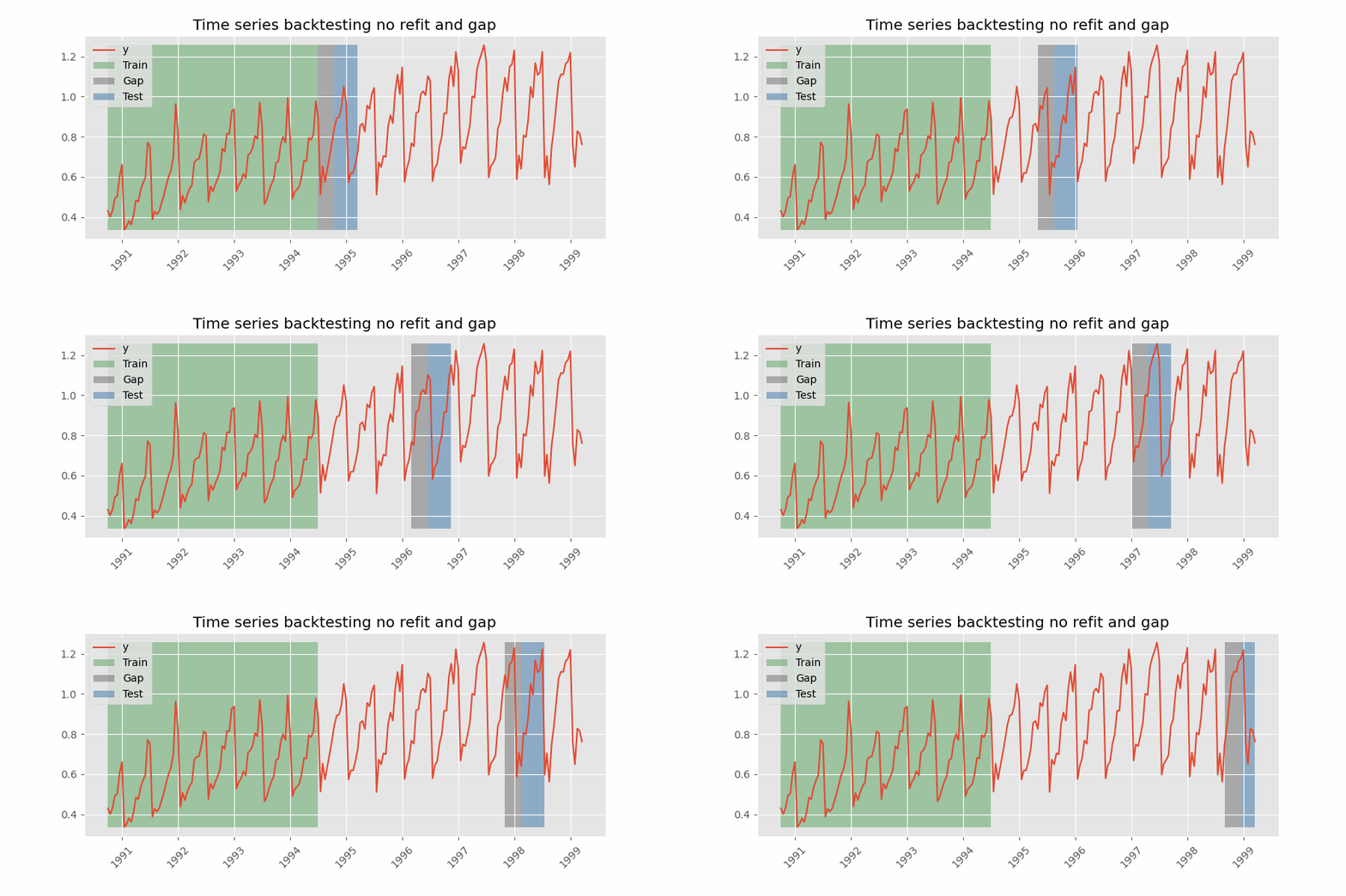
这种评估方式可以通过将 backtesting_forecaster() 函数与 TimeSeriesFold 的 gap 参数结合使用轻松实现。此外,TimeSeriesFold 的 allow_incomplete_fold 参数用于控制当最后一个折不满足所需步数时是否保留它(本例使用其默认值 True)。针对该场景调整后的流程每天运行一次,步骤如下:
在测试集的第一天上午 11:00,预测接下来 36 小时(当天剩余 12 小时加上次日 24 小时)。
只保留次日的预测(从位置 12 开始)。
将次日 11:00 前的数据加入测试集。
重复该过程。
因此,每天上午 11:00,模型都能访问到截至该时刻的真实需求值。
⚠️ 警告
有两个注意事项:
- 训练数据必须在 gap 开始处结束。本例中,
initial_train_size需多加 12 个位置,使训练数据结束于 2014-10-01 11:00:00。第一个预测步为 2014-10-01 12:00:00(作为 gap 的一部分被丢弃),第一个被保留的预测为 2014-10-02 00:00:00。 - 本例中,虽然每次只保留最后 24 个预测(steps)用于模型评估,但每个折实际预测的总步数为 36(steps + gap)。
# initial_train_size + 12 位置的末尾
# ==============================================================================
data.iloc[:len(data.loc[:end_validation]) + 12].tail(2)
| Demand | month_sin | month_cos | week_sin | week_cos | day_of_week_sin | day_of_week_cos | hour_sin | hour_cos | sunrise_hour_sin | ... | Temperature_window_1D_min | Temperature_window_7D_mean | Temperature_window_7D_max | Temperature_window_7D_min | holiday_previous_day | holiday_next_day | Temperature | Holiday | daylight_hours | is_daylight | |
|---|---|---|---|---|---|---|---|---|---|---|---|---|---|---|---|---|---|---|---|---|---|
| Time | |||||||||||||||||||||
| 2014-10-01 10:00:00+10:00 | 5069.862793 | -0.866025 | 0.5 | -0.999561 | 0.029633 | 0.974928 | -0.222521 | 0.500000 | -0.866025 | 1.0 | ... | 7.3 | 16.525892 | 27.35 | 7.3 | 0.0 | 0.0 | 13.35 | 0.0 | 12.0 | 1.0 |
| 2014-10-01 11:00:00+10:00 | 4984.418457 | -0.866025 | 0.5 | -0.999561 | 0.029633 | 0.974928 | -0.222521 | 0.258819 | -0.965926 | 1.0 | ... | 7.3 | 16.480953 | 27.35 | 7.3 | 0.0 | 0.0 | 14.20 | 0.0 | 12.0 | 1.0 |
2 rows × 91 columns
# 预测器
# ==============================================================================
forecaster = ForecasterRecursive(
estimator = LGBMRegressor(**best_params),
lags = lags_select,
window_features = window_features_select
)
# 带间隔的回测
# ==============================================================================
cv = TimeSeriesFold(
steps = 24,
initial_train_size = len(data.loc[:end_validation]) + 12,
refit = False,
gap = 12,
)
metric, predictions = backtesting_forecaster(
forecaster = forecaster,
y = data['Demand'],
exog = data[exog_select],
cv = cv,
metric = 'mean_absolute_error'
)
display(metric)
predictions.head(5)
| mean_absolute_error | |
|---|---|
| 0 | 137.442676 |
| fold | pred | |
|---|---|---|
| 2014-10-02 00:00:00+10:00 | 0 | 4648.312730 |
| 2014-10-02 01:00:00+10:00 | 0 | 4262.076003 |
| 2014-10-02 02:00:00+10:00 | 0 | 3915.741748 |
| 2014-10-02 03:00:00+10:00 | 0 | 3639.160143 |
| 2014-10-02 04:00:00+10:00 | 0 | 3464.580335 |
如预期,随着预测时长从 24 小时增加到 36 小时,误差也随之增加。
结论
梯度提升模型已被证明是预测能源需求的强大工具。其主要优势之一在于能够轻松引入外生变量,从而显著提升模型的预测能力。此外,借助可解释性技术,可以直观且定量地理解变量及其取值对预测的影响。所有这些问题都可以通过 skforecast 库轻松解决。
测试集上平均绝对误差(MAE)的变化(见下表)总结了每一步的贡献:
仅使用最近 24 个滞后和一个滚动均值的递归预测器优于基线模型(前一天同一小时的值),但改进幅度有限。
引入外生变量(日历、日照、温度和节假日)是影响最大的一步:误差降至大约一半。
对滞后和超参数进行调优可使误差再降低约 10%。最佳配置包含前一周的滞后。
特征选择保留了不到三分之一的特征,而误差非常接近,从而得到更简单、更快的模型。
在使用相同特征的情况下,直接策略取得了最低的误差,但计算成本更高。
当预测必须提前 12 小时发布时,误差会增加,这与更长的预测时长相符。
# 结果
# ======================================================================================
forecaster_type = [
'ForecasterEquivalentDate (Baseline)', 'ForecasterRecursive',
'ForecasterRecursive', 'ForecasterRecursive', 'ForecasterRecursive',
'ForecasterDirect'
]
exog_included = [
'False', 'False', 'True', 'True', 'True (Feature Selection)',
'True (Feature Selection)'
]
tuned = ['False', 'False', 'False', 'True', 'True', 'True']
metrics = pd.concat(
[
metric_baseline, metric_recursive_no_exog, metric_recursive_exog,
metric_recursive_exog_tuned, metric_recursive_exog_selection,
metric_direct_exog_selection
],
axis=0,
)
metrics.insert(0, 'Forecaster', forecaster_type)
metrics.insert(1, 'Exogenous Variables', exog_included)
metrics.insert(2, 'Tuned Hyperparameters', tuned)
metrics = (
metrics.reset_index(drop=True).round(2).sort_values(by='mean_absolute_error')
)
metrics
| Forecaster | Exogenous Variables | Tuned Hyperparameters | mean_absolute_error | |
|---|---|---|---|---|
| 5 | ForecasterDirect | True (Feature Selection) | True | 115.02 |
| 3 | ForecasterRecursive | True | True | 124.96 |
| 4 | ForecasterRecursive | True (Feature Selection) | True | 127.65 |
| 2 | ForecasterRecursive | True | False | 136.79 |
| 1 | ForecasterRecursive | False | False | 278.15 |
| 0 | ForecasterEquivalentDate (Baseline) | False | False | 318.69 |
会话信息
import session_info
session_info.show(html=False)
----- astral 3.2 feature_engine 1.9.4 lightgbm 4.7.0 matplotlib 3.10.9 numpy 2.4.6 optuna 4.9.0 pandas 2.3.3 plotly 6.9.0 session_info v1.0.1 shap 0.52.0 skforecast 0.25.0 sklearn 1.7.2 statsmodels 0.14.6 ----- IPython 9.15.0 jupyter_client 8.9.1 jupyter_core 5.9.1 ----- Python 3.13.14 | packaged by conda-forge | (main, Jun 12 2026, 09:44:26) [MSC v.1944 64 bit (AMD64)] Windows-11-10.0.26200-SP0 ----- Session information updated at 2026-09-22 09:23
引用
如何引用本文档
如果你使用了本文档或其中的任何部分,请注明来源,谢谢!
《使用机器学习预测能源需求》作者:Joaquín Amat Rodrigo 和 Javier Escobar Ortiz,遵循 Attribution-NonCommercial-ShareAlike 4.0 International (CC BY-NC-SA 4.0 DEED) 许可,原文链接:https://www.cienciadedatos.net/documentos/py29-forecasting-electricity-power-demand-python.html
如何引用 skforecast
如果你在论文或出版物中使用了 skforecast,欢迎引用已发布的软件。
Zenodo:
Amat Rodrigo, Joaquin, & Escobar Ortiz, Javier. (2026). skforecast (v0.25.0). Zenodo. https://doi.org/10.5281/zenodo.8382788
APA:
Amat Rodrigo, J., & Escobar Ortiz, J. (2026). skforecast (Version 0.25.0) [计算机软件]. https://doi.org/10.5281/zenodo.8382788
BibTeX:
@software{skforecast, author = {Amat Rodrigo, Joaquin and Escobar Ortiz, Javier}, title = {skforecast}, version = {0.25.0}, month = {09}, year = {2026}, license = {BSD-3-Clause}, url = {https://skforecast.org/}, doi = {10.5281/zenodo.8382788} }
喜欢这篇文章吗?你的支持很重要
你的支持将帮助我持续创作免费教育内容,感谢!😊




本作品由 Joaquín Amat Rodrigo 和 Javier Escobar Ortiz 创作,采用 知识共享署名-非商业性使用-相同方式共享 4.0 国际许可协议。
允许:
-
共享:可以以任何媒介或格式复制、传播本材料。
-
演绎:可以对本材料进行再混合、转换和创作。
须遵守以下条款: